
Generative AI can make cloud costs difficult to predict. A single five-word prompt can run complex operations and generate significant costs. Traditional metrics like requests per second no longer help you estimate your bill, increasing the risk of unexpected cost spikes.
While Google Cloud offers budget alerts, you need proactive guardrails that work out of the box – without the friction of writing custom JSON policies, configuring complex roles, or maintaining bespoke scripts.
Today, we are announcing two native features in the Google Cloud Billing console: early anomalies on AI services and spend caps on Google Cloud Budgets. Together, these tools help you detect unusual spend early and enforce firm limits so you can build and experiment with confidence.
A two-pronged defense playbook
The inherent variability and potential for rapid scaling in AI usage demand a new level of responsiveness from cost management tools. To address this, we’re providing tools that allow users to effortlessly set up a GCP defense playbook.
1. Detect: early anomalies on AI services
This new feature, located within the Anomalies tool on the billing console, automatically alerts users of directional variances (anomalies) in daily AI costs within a project. While Google Cloud has offered standard Cost Anomaly Detection, this new capability represents a major architectural shift designed specifically for the speed of AI workloads.
How do early anomalies work?
-
Dynamic baseline modeling: The system automatically analyzes historical project data to build an expected seasonal baseline of daily service-level costs—no manual threshold configuration required.
-
Early cost monitoring: Instead of waiting for billing cycles to reconcile, the tool monitors early cost signals per service and alerts before actual costs are reported.
-
Automated triage with RCA: If a daily cost signal trends abnormally, the system flags the deviation and generates a Root Cause Analysis (RCA) highlighting the top 3 SKUs driving the surge.
Screenshot of the Billing Console showing an Early Anomaly alert with the Root Cause Analysis (RCA) breakdown highlighting the driving SKUs.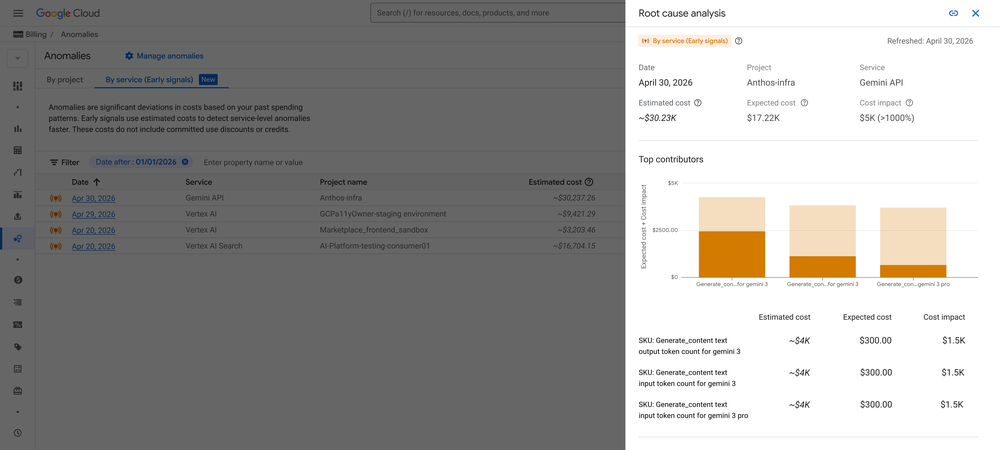
Early anomaly signals allow your team to investigate upward trending costs and intervene before they escalate dramatically. Monitoring these daily variances helps you easily identify the most anomalous high-velocity services, making them perfect candidates for a firm enforcement cap.
2. Enforce: Spend caps on Google Cloud Budgets
Once you identify a service that needs tight boundaries, the second step of the playbook comes in. Spend Caps is a new, native feature on Google Cloud Budgets that empowers you to set a monthly financial cap on specific services within a project. When accumulated spend reaches your defined cap, the system automatically restricts further cost-incurring usage for that specific service within that project. This provides a crucial safety net for your cloud finances without risking the rest of your infrastructure.
How do spend caps work?
During this Public Preview, you can apply Spend Caps to a single project and service for a fixed monthly timeframe.
Screenshot of the Google Cloud Budgets interface highlighting the “Budget Type” selection with the new “Spend Cap” option enabled.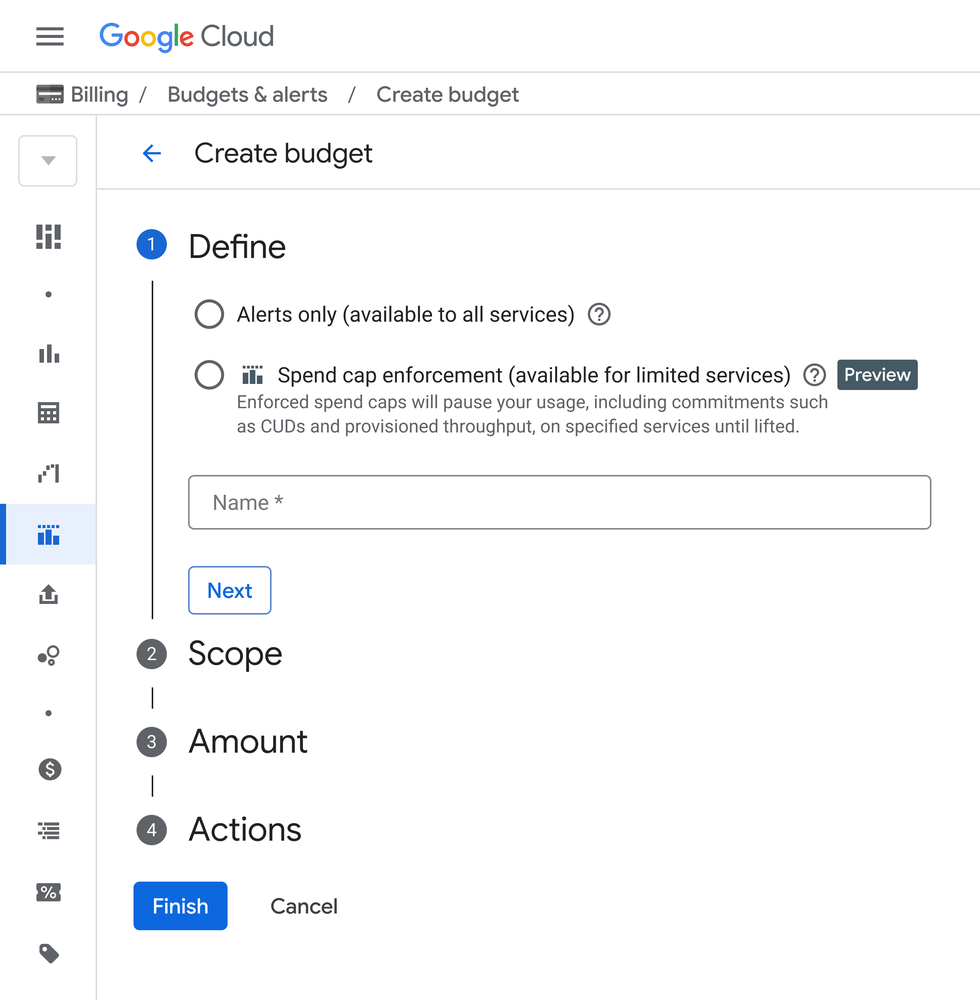
Once the cumulative costs reach your defined cap, Google Cloud automatically takes action to prevent further billable usage.
What makes Spend Caps so special?
-
It is non-destructive i.e your data and resources are not deleted, and services outside the scope of the budget are entirely unaffected.
-
You stay informed i.e Billing Administrators and Project Owners receive automated email alerts at 50%, 80%, and 100% of the budget
-
One-click recovery i.e if a Spend Cap is triggered, the usage block remains in place until it is manually lifted from the Google Cloud Budgets UI with a single click.
Screenshot of the “Lift spend cap” button in the Google Cloud Budgets UI showing the frictionless manual reversal flow
While spend caps successfully halt new on-demand charges by pausing usage, any underlying fixed commitment fees (such as Committed Use Discounts or Provisioned Throughput) will continue to bill at their flat contractual rate.
When do spend caps trigger?
Since AI and cloud costs can rack up at lightning speed, guardrails must act with equal urgency. Traditional billing data can sometimes take hours to reconcile, but Spend Caps for AI services trigger within minutes of hitting your defined threshold. This rapid, near real-time enforcement is specifically engineered to limit your AI specific financial exposure before a runaway model, an infinite loop, or a massive query can spike your bill.
The defense playbook at a glance
By combining early anomaly signals with automated financial boundaries, Google Cloud provides a complete closed-loop defense for your AI spend.
|
Playbook step |
Tool |
What it does |
Key benefit |
Supported servicesPreview |
|
Step 1: Detect |
Early Anomalies on Services |
Analyzes early cost signals daily to alert you of directional spend variances before they hit your invoice. |
Spot cost spikes early and pinpoint the exact SKU driving the trend. |
Gemini API, Agent Platform, Cloud Run, Cloud Run Functions |
|
Step 2: Enforce |
Spend Caps on Budgets |
Automatically halts usage for a specific project/service once your defined budget is breached. |
Protection against runaway spend without deleting resources |
Gemini API, Agent Platform, Cloud Run, Cloud Run Functions |
By deploying this dual-pronged defense strategy that works out-of-the-box, your engineering teams can move quickly, experiment safely, and focus entirely on innovation.
Get started today
-
Explore early anomalies: Head to the “Anomalies” section of your Google Cloud Billing Console.
-
Set your first spend cap: Go to the Budgets & Alerts page in the Billing Console to apply native caps to your test or development environments.
- For more details on configuration, service-specific behaviors, and permissions, read the Manage Anomalies and Spend Caps on Budgets documentation.