
For years, Swift was perceived mainly as a UI language tied to Apple client devices. With the release of Swift 6 and strict concurrency checking, Swift has matured into a premier systems with cloud engineering language that matches Go and Rust in memory safety while running with predictable, reference-counted CPU performance.
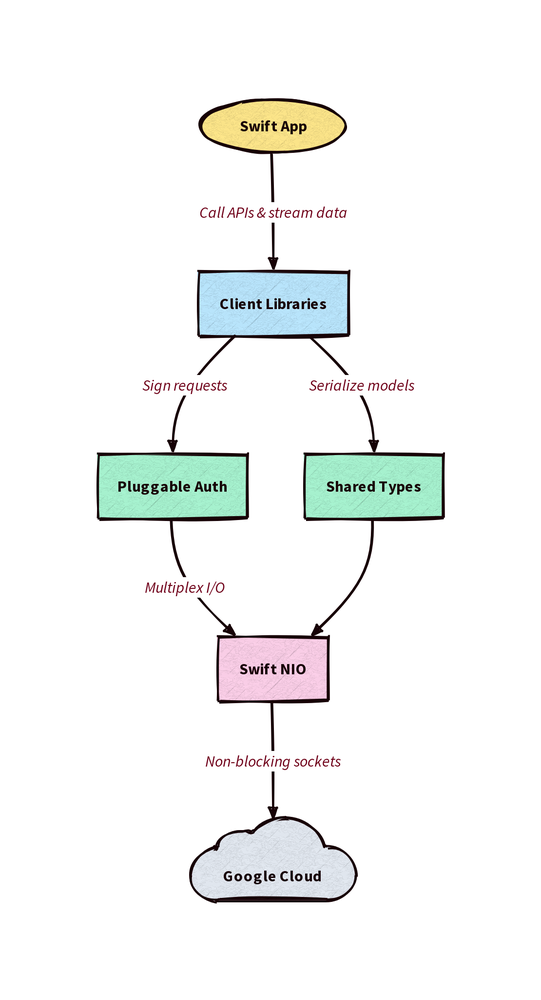
To support this ecosystem, Google engineering has launched the official Google Cloud API Client Libraries for Swift. Built from the ground up for Swift 6.2+, this new SDK uses the latest non-blocking Swift NIO event loops, HTTP/2 multiplexing, gRPC transport, and zero-cost compile-time data race safety.
In this article, we’ll walk you through all you need to know to get started, and to understand how the Server Side Cloud Swift SDK, or google-cloud-swift, works.
The rise of server-side Swift and cloud-native concurrency
Traditional backend languages often force a compromise between developer velocity and system resource usage. Managed runtimes rely on heavy garbage collectors that induce tail-latency spikes under heavy traffic, while systems languages can slow down feature iteration.
Server-side Swift balances both ends of the spectrum. Using Automatic Reference Counting (ARC), Swift reclaims memory deterministically without stop-the-world pauses. More importantly, Swift 6 introduces compile-time concurrency checking. When you share state between async tasks across a cloud microservice, the compiler enforces that types conform to Sendable. Data races are caught in your editor before a binary ever compiles or reaches production.
At the network layer, every request to Google Cloud APIs runs over event-driven, non-blocking sockets that scale across multicore Linux server environments without spawning system threads per connection.
Where to use the Swift SDK
The Server Side Cloud Swift SDK is engineered for server, container, and automated DevOps environments.
When you build high-throughput microservices with Swift web frameworks like Hummingbird or Vapor, google-cloud-swift provides native access to Cloud Storage, AI, Identity and Access Management (IAM), and over one hundred other Google Cloud services. You can containerize your executable on Linux and deploy directly to Cloud Run, Google Kubernetes Engine (GKE), or Compute Engine VMs.
Because the SDK compiles on macOS, and Linux, you can develop the backend in your preferred development environment, and then seamlessly deploy to production. And using Swift on both the frontend and backend allows you to share application-specific types across both.
The SDK also excels at platform engineering and DevOps automation. You can author cross-platform CLI utilities and data rotation scripts that run on your developer laptop or inside CI/CD pipelines. These tools authenticate automatically against Google Cloud using Application Default Credentials (ADC) or Workload Identity Federation.
If you’re building an iOS, iPadOS, or visionOS app for the Apple App Store, you should not embed google-cloud-swift directly into your client bundle. Shipping Google Cloud service account keys or administrative credentials inside a client binary creates security risks. For direct client-side features, use the Firebase SDK for Apple Platforms to handle user authentication, real-time Firestore sync, and client-side security rules, or route requests through your own Cloud Run backend API.
Getting started with your IDE and packages
Because google-cloud-swift treats Linux and macOS as first-class citizens, you can develop on Apple hardware with Xcode or on Linux workstations with Visual Studio Code and swiftly.
To install the official Swift compiler on Linux workstations using the swiftly CLI installer, run:
- code_block
- <ListValue: [StructValue([('code', 'curl -L https://swift-server.github.io/swiftly/swiftly-install.sh | bash -s — -y'), ('language', ''), ('caption', )])]>
Alternatively, you can download prebuilt toolchain tarballs directly from official Swift Downloads for Ubuntu, Debian, Fedora, or Amazon Linux. Note that google-cloud-swift requires Swift 6.2 or later, so verify your compiler version with swift --version after installation.
To resolve Swift Package Manager bare repository trust warnings when cloning across Linux filesystems, configure Git before building with git config --global safe.bareRepository all.
Add the required packages to your Package.swift manifest:
- code_block
- <ListValue: [StructValue([('code', 'swift package add-dependency https://github.com/googleapis/swift-google-cloud-language-v2.git –from 0.4.0rnswift package add-target-dependency GoogleCloudLanguageV2 CloudBackendService –package swift-google-cloud-language-v2'), ('language', ''), ('caption', )])]>
On macOS you need to change the platforms directive:
- code_block
- <ListValue: [StructValue([('code', '// swift-tools-version: 6.2rnimport PackageDescriptionrnrnlet package = Package(rn name: "CloudBackendService",rn // Applied when compiling on Darwin/macOS; ignored by SPM on Linux targetsrn platforms: [.macOS(.v15)],rn … …'), ('language', ''), ('caption', )])]>
In most environments a default-initialized client can make requests:
- code_block
- <ListValue: [StructValue([('code', 'import Foundationrnimport GoogleCloudLanguageV2rnrnfunc analyzeTextSentiment(text: String) async throws {rn // Initialize explicit API key credentialsrn let client = try LanguageServiceClient()rnrn // Configure request using structured builder closurern let document = Document().with {rn $0.type = .plainTextrn $0.source = .content(text)rn }rnrn let response = try await client.analyzeSentiment(rn request: AnalyzeSentimentRequest().with { $0.document = document }rn )rnrn if let sentiment = response.documentSentiment {rn print("Document sentiment score: \(sentiment.score)")rn }rn}'), ('language', ''), ('caption', )])]>
Notice how Document().with { ... } avoids verbose temporary variables or mutating setters by providing a clean, thread-safe configuration closure.
Networking, transport, and authentication
The repository splits infrastructure primitives into modular packages under packages/:
-
swift-google-cloud-auth: Implements Application Default Credentials discovery, service account JWT signing, external account exchange for Workload Identity Federation, and API keys. -
swift-google-cloud-wkt: Provides idiomatic Swift types for Google Protocol Buffer well-known types, including nanosecond-precisionTimestamprepresentations that bridge cleanly to Swift’sDate. -
swift-google-cloud-gax: Handles Google API Extensions such as automated retry loops, exponential backoff, and pagination state machines.
When you initialize any client library without arguments, Credentials.default() automatically scans your environment (GOOGLE_APPLICATION_CREDENTIALS, quota project variables, or the local Google Cloud CLI configuration) and authenticates connections over gRPC or HTTP/2.
If you need to programmatically override credentials with an API key or attach custom access headers, you can pass explicit configuration options. For example, you could modify the previous example to use the following:
- code_block
- <ListValue: [StructValue([('code', 'import Foundationrnimport GoogleCloudAuthrnimport GoogleCloudGaxrnimport GoogleCloudLanguageV2rnrnfunc analyzeTextSentiment(apiKey: String, text: String) async throws {rn // Initialize explicit API key credentialsrn let credentials = try Credentials(configuration: .apiKey(apiKey))rn let client = try LanguageServiceClient(rn ClientOptions().with { $0.credentials = credentials }rn )rnrn // Configure request using structured builder closurern let document = Document().with {rn $0.type = .plainTextrn $0.source = .content(text)rn }rnrn let response = try await client.analyzeSentiment(rn request: AnalyzeSentimentRequest().with { $0.document = document }rn )rnrn if let sentiment = response.documentSentiment {rn print("Document sentiment score: \(sentiment.score)")rn }rn}'), ('language', ''), ('caption', )])]>
The autogenerated client ecosystem
Google Cloud operates a vast ecosystem of APIs whose schemas update regularly. The teams supporting google-cloud-swift use code generators to automatically update the client libraries with the latest features and with new APIs. Using code generators produces stable APIs, without disruptive breaking changes. While the releases are on a fixed cadence, please contact Cloud Customer Care if you need a particular feature or API urgently.
Whether you need to rotate keys in Secret Manager or invoke multimodal inference models via the Gemini API on Gemini Enterprise Agent Platform, the generated SDKs follow consistent naming and async/await signatures.
These generated clients offer more than plain unary RPC wrappers. They also offer wrappers that simplify application development. For example, iterating over long results involves fetching pages of results with one RPC, iterating over the page of results, and then preparing a new request to retrieve the following page. Using the generated clients this becomes an asynchronous iterator. This example shows how to query project secrets using GoogleCloudSecretManagerV1:
- code_block
- <ListValue: [StructValue([('code', 'import Foundationrnimport GoogleCloudSecretManagerV1rnrn@mainrnstruct SecretManagerQuickstart {rn static func main() async throws {rn guard let projectId = CommandLine.arguments.dropFirst().first else {rn print("Usage: SecretManagerQuickstart “)rn exit(1)rn }rnrn // Connects using Application Default Credentials automaticallyrn let client = try SecretManagerServiceClient()rnrn let request = ListSecretsRequest().with {rn $0.parent = “projects/\(projectId)”rn }rnrn // Async sequence streams pages of secrets automaticallyrn print(“Secrets in project \(projectId):”)rn for try await item in try client.listSecretsByItem(request: request) {rn print(” – \(item.name)”)rn }rn }rn}’), (‘language’, ”), (‘caption’, )])]>
The pagination response returns an asynchronous sequence (AsyncSequence). You can iterate over items with for try await while the client library fetches subsequent pages in the background over non-blocking NIO channels.
Where to go next
With google-cloud-swift, server-side Swift developers can write end-to-end cloud infrastructure with compile-time race safety, native async/await ergonomic APIs, and zero OS thread congestion.
To inspect the source code, open issues, or contribute new veneers, visit the official repository at googleapis/google-cloud-swift.
Want to discuss server-side Swift architectures or Cloud Run containerization? Join the Google Developer Program to continue the conversation.