
Summary: Edge for Business is the most used enterprise browser in the world. At Microsoft Ignite 2026, we’re introducing new ways for users and agents to get more done. Deeper integration with Microsoft 365 security capabilities helps IT protect and manage browser activity. We’re also expanding our focus, supporting managed service providers (MSPs) with multi-tenant browser policy management through inforcer.
The browser looms large in a cloud-centered world. By an industry estimate, roughly 85% of work is now happening in the browser 1. Increasingly, it’s a platform on which AI agents can act alongside people across websites and apps, inside an authenticated enterprise session. Reflecting these shifts, Forrester recently stated that the browser has evolved to a “first-class endpoint” in its “Top 10 Trends Shaping Endpoint Security in 2026” report.
For IT and security teams, that raises the bar for the browser. Today, Edge for Business is the most used enterprise browser in the world 2. This milestone is built on your trust. You do the critical work behind the scenes to keep your organizations secure and productive, and we’re grateful for the opportunity to support you.
Looking ahead, our vision is to deliver the best enterprise browser for humans and agents—and expand our impact by helping managed service providers (MSPs) secure work for their customers. Read on to discover how we’re starting to bring that vision to life at Microsoft Ignite 2026.
Jump to
- Agents that work your way, on your terms: Reusable skills, faster skills, fewer tokens, agents in managed browsing, and more on governance and a system of safety.
- Everyday browsing, made smarter: Update web experiences without code, create an interactive brief from tabs, write and plan with context from your work.
- Browser security in a high-velocity threat environment: Updates with less disruption, manage extension risk, browser signals in Microsoft Sentinel, private web apps without a VPN, on-screen redaction.
- Browser security, strengthened by our partner ecosystem: Multi-tenant policy management with inforcer, partner connectors on more platforms, and Akamai Workforce Protector on mobile.
- How should IT teams get started? It’s EZ
Agents that work your way, on your terms
Your organization is probably already juggling more than one agent. Alongside Microsoft Copilot, your users may rely on agents such as Claude or ChatGPT, in dedicated apps, command-line tools, or custom builds. Users want the power. You need the control.
Whatever the agent, Microsoft or otherwise, it should do its best work in Edge for Business: faster, with fewer tokens, and more accurate results. IT and security teams get predictability too: agents can run in the managed browser you’ve configured, under your control and visibility. Today we’re sharing the first building blocks.
Delegate everyday browsing tasks to Cowork
At a glance: Cowork in Edge for Business now includes agentic browsing: it can complete multi-step tasks across websites on users’ behalf.
At Ignite last year, we introduced AI browsing with Copilot in Edge for Business, and many of you put it to work in preview. Thank you. We’re excited to share agentic browsing is now part of Cowork, available via the sidepane, the new tab page, and web. With this, users have one place to delegate work, from creating docs to prepping for meetings or completing a task on the web. It’s an easy way for users to get comfortable with agentic work, starting with small, everyday tasks, so they can get back to the work that takes creativity, judgment, and complex thinking.
Generally available. Requires Microsoft 365 Copilot license with usage-based billing enabled.
Turn complex tasks into Cowork skills by simply recording them
At a glance: Skills recorder in Edge for Business turns a workflow into a reusable, sharable Cowork skill.
Cowork handles everyday tasks well. But some work is more complex: it can take many steps, span multiple systems, and depend on specialized knowledge. With skills recorder, a user can record themselves completing an end-to-end process once and turn it into a skill that can be shared with teammates. And because the skill follows the same proven steps every time, that means fewer tokens spent and more consistent results.
Available in preview by end of year. Requires Microsoft 365 Copilot license with usage-based billing enabled.
Faster skills that use fewer tokens
At a glance: Edge for Business is working to help any agent complete common web tasks faster and with fewer tokens.
We’re working on optimizing how agents carry out the most common actions on the world’s most popular websites. Regardless of the agent being used, Edge for Business will take the most token-efficient path to task completion. Early internal tests show an average of 30% less token usage. It’s early, but the direction is clear: faster results, fewer tokens per task, and more consistent execution.
Put browser agents on managed ground
At a glance: The managed agent browsing experience in Edge for Business helps IT bring Microsoft and other providers into a governed browser, under the policies IT already manages.
Every agent that opens a browser raises the same practical questions: Can the agent access more than the person it represents? Do data protections still apply? Can users and admins tell whether a person or an agent is working?
The new managed agent browsing experience enables IT to help enforce the use of Edge for Business by agents from Microsoft and other providers. This helps ensure that whenever an agentic task needs a browser, it occurs within the bounds of a governed browser. Each agent works in a dedicated window with its own Microsoft Entra agent identity, and operates within the user’s existing permissions and organizational policies. Visual cues make it clear when a window belongs to an agent.
Available in preview with Microsoft 365 E5 license.
What’s next: see and govern browser agents alongside other agents
At a glance: Our vision is to bring browser agents into Agent 365 and Microsoft Entra logs, so you can govern them alongside other agents and tell their actions apart from a person’s.
Our vision is to make agents running in Edge for Business visible and governable across Microsoft’s identity and management tools. Because each agent session carries its own Entra agent identity, you’ll be able to view browser agents in Agent 365 alongside the rest of your organization’s agents. In the future, see which agents are in use and who’s using them, apply policies, and block or quarantine an agent that isn’t approved or is exhibiting risky behavior. When you need to investigate, Microsoft Entra logs will show which agent took an action and which user it was acting for, so agent actions are easy to tell apart from those of a person.
An integrated system of safety for built-in AI
At a glance: AI built into Edge for Business is backed by existing enterprise protections, policy-based rollout, and safeguards for agentic browsing.
The business wants AI now. You want to keep that progress secure. With Edge for Business, you don’t have to choose. Its system of safety for built-in AI is anchored on a philosophy of “controls-in-depth”:
- Start with a secure enterprise browser foundation: Edge for Business provides a governed base. It enforces your organization’s existing protections on built-in AI experiences, including Purview Data Loss Prevention and session controls. In preview, Protected session creates an isolated, secure chat session where Copilot can interact with protected content while helping preserve organizational data policies.
- Enterprise data protection (EDP): You already know and trust EDP for email and other files – the same promise applies to Copilot. Prompts, responses, and files stay within your tenant and aren’t used to train models.
- Policy-based control: Advanced AI capabilities come with policies, so IT can configure and manage how they’re used across your organization.
- Purpose-built agentic safeguards: Cowork browses within the user’s existing permissions and organizational policies. Users stay in control: Cowork hands back sign-ins and payments, asks before sensitive actions, and can be watched or stopped at any time.
Everyday browsing, made smarter
Not every task needs an agent. Built-in AI in Edge for Business helps make existing workflows faster and better, from writing to reshaping the sites users rely on.
Make web experiences better with Remix
At a glance: Remix in Edge for Business lets users customize how a website looks and works without writing code or changing the underlying site.
Users often rely on poorly designed or hard-to-navigate sites, including legacy apps and dashboards without developer support. With Remix, they can clear away clutter, add missing tools, or change a page’s look—without waiting for a fix or writing code. To remix a page, they can choose from preset themes and fonts, or describe a custom Remix in plain words. Remixes are stored locally, and users can turn them on and off with a simple toggle.
Generally available.
Turn information across tabs into an interactive brief
At a glance: Interactive brief in Edge for Business quickly turns information across your browser tabs into a polished, interactive page you can explore and share.
An executive asks for a status update. You have the data, but it’s scattered and you don’t know what they want to dig into. Instead of building a presentation to anticipate every question, interactive brief quickly turns the information across your browser tabs into an interactive page that can be explored during the meeting and shared afterward.
Each brief is saved to your OneDrive as a snapshot, shared just like any other OneDrive file, and governed by the policies IT already manages. No new shadow IT problem.
Available in preview by end of year. Requires Microsoft 365 Copilot license with usage-based billing enabled.
Get writing help, informed by your work
At a glance: Writing assistance in Edge for Business helps users write in any form field with context from their work.
Writing assistance in Edge for Business helps users draft and edit text in form fields, including on internal and line-of-business sites that rarely have writing help built in. Connected to Work IQ, it can write using context from the user’s calendar, files, and more.
Available in preview. Work grounding requires a Microsoft 365 Copilot license.
Get suggested next steps with Journeys
At a glance: Journeys in Edge for Business suggests next steps based on your work and browsing.
Piecing together status and action items across calendars, emails, and chats takes time. Journeys—shown as “Get things done” on a new tab page—performs that legwork and suggests next steps on workstreams, based on the user’s work and browsing context.
Available in preview. Requires Microsoft 365 Copilot license.
Browser security in a high-velocity threat environment
The best enterprise browser for humans and agents needs more than agent guardrails: a rock-solid security foundation for today’s enterprise browsing must be in place. With cyberthreats moving at a historic pace, you need practical security solutions now.
Apply urgent browser updates with less disruption
At a glance: Edge for Business helps you apply security fixes faster with fewer interruptions to users. Restart to update on idle, Security Insights, and Security Update Alerts are available today, and Microsoft is exploring seamless updates that avoid restarts.
Applying urgent security fixes is critical. The challenge is doing so without repeatedly interrupting employees. Microsoft is exploring seamless updates to update Edge without closing work or requiring restarts. An early prototype demonstrates the ambition and invites industry discussion.
Available today, Restart to update on idle can relaunch Edge for Business during an idle period. This shrinks the gap between patch availability and installation. To monitor Edge versions across your estate, turn on Security Insights. To help improve the signal-to-noise ratio, set Security Update Alerts to notify when updates meet your chosen severity threshold.
Learn more in our recent blog.
See and control extension risk
At a glance: Edge for Business helps you assess extension risk with Extension safety, and protect page content with Extension leak control.
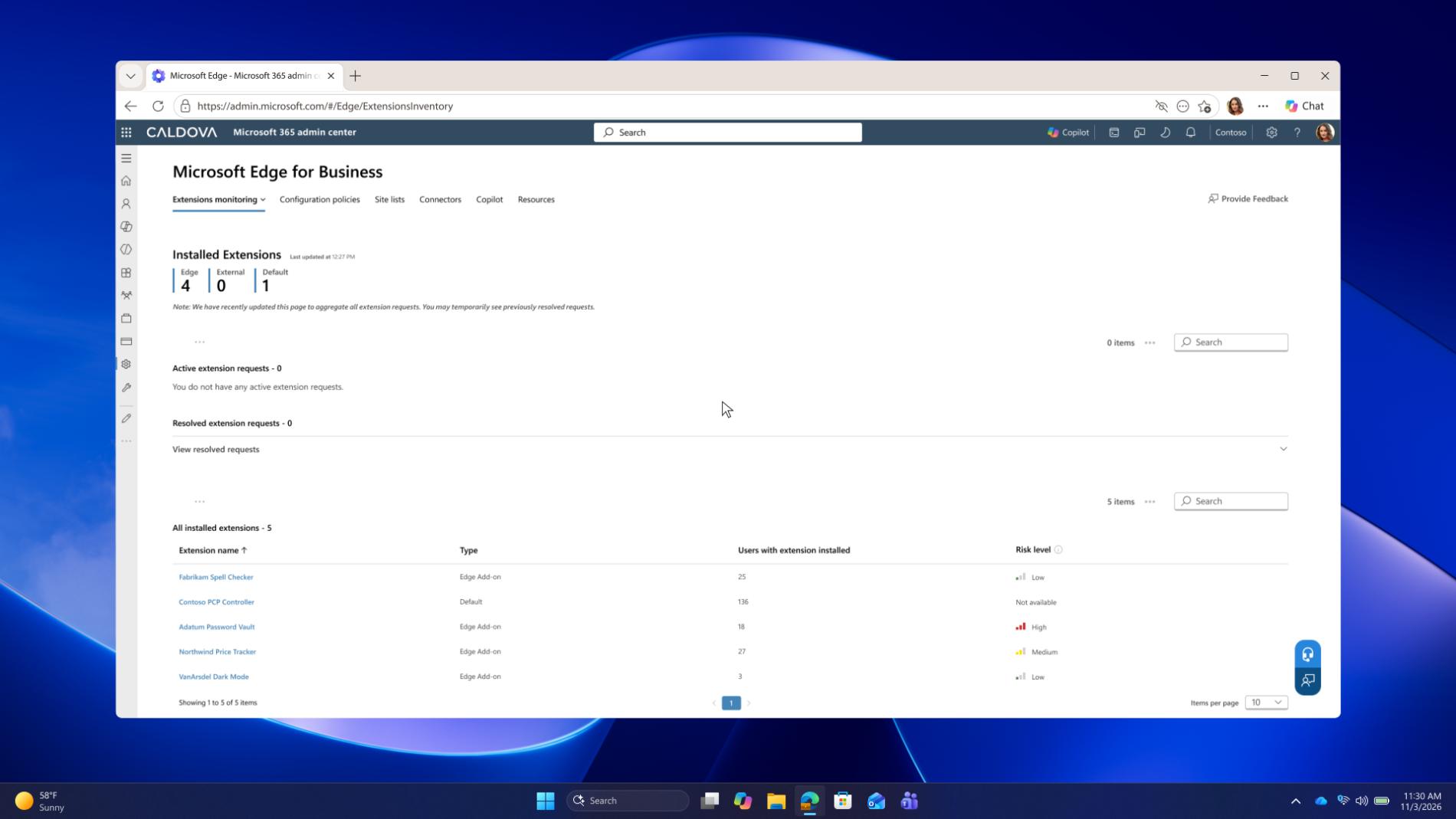
Extensions can expand what employees can do, but they are often vectors of risk.
Extension safety provides an organization-wide inventory with Akamai and Spin.AI risk scores at the extension and version level. Now it’s easier for admins to assess risk and make allow and block decisions.
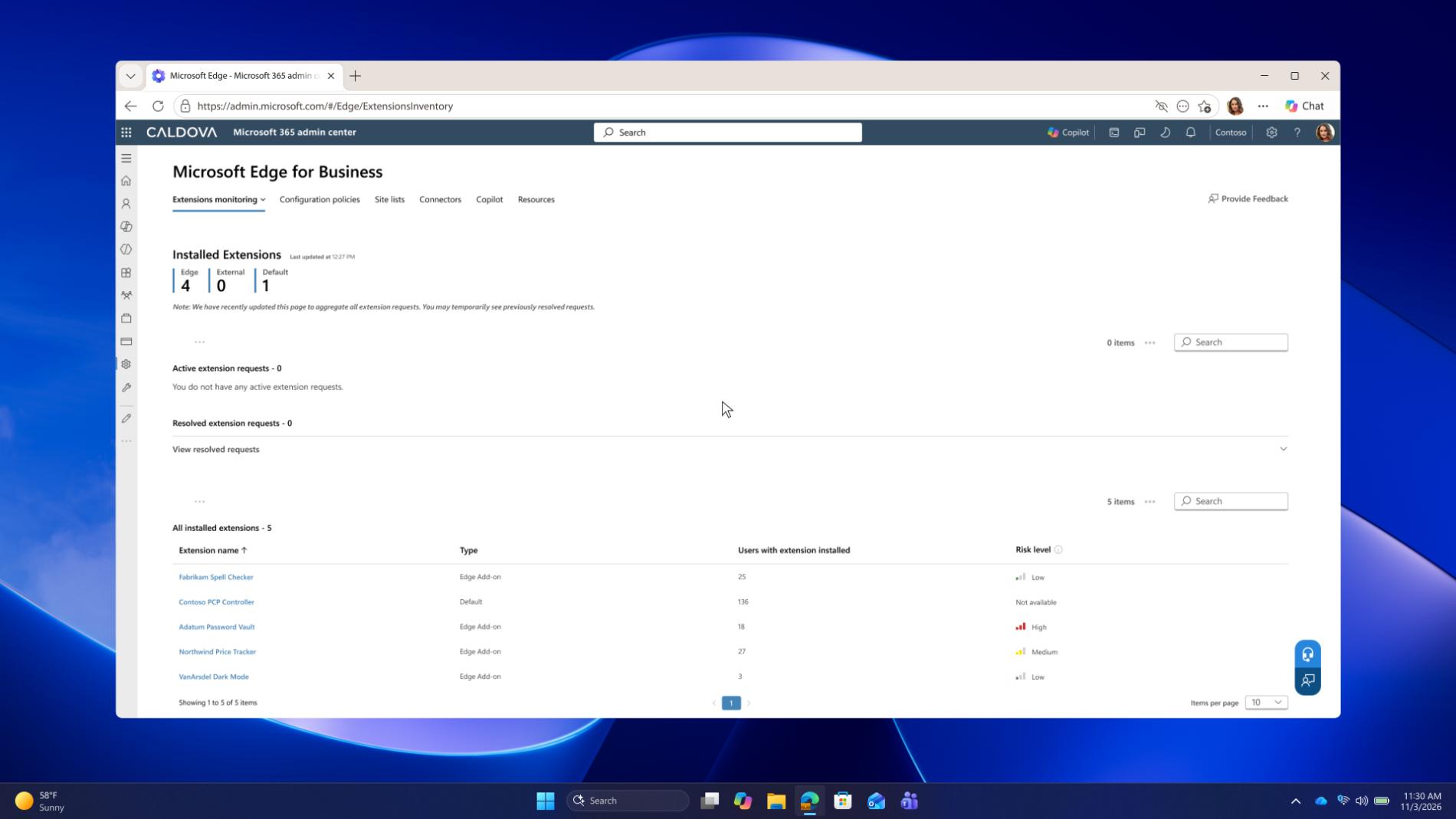
Generally available. Requires Microsoft 365 license.
An approved extension may still need boundaries. Only on Edge for Business, extension leak control prevents organization-installed extensions from reading content on protected pages. Those extensions can still work on other pages.
Available in preview. Requires Microsoft 365 E3 licensing.
Bring browser signals into Microsoft Sentinel
At a glance: A new connector brings Edge for Business browser activity into Microsoft Sentinel.
A new native connector for Edge for Business brings browser security events and audit logs into Microsoft Sentinel, adding context for SOC teams and eliminating a browser blind spot.
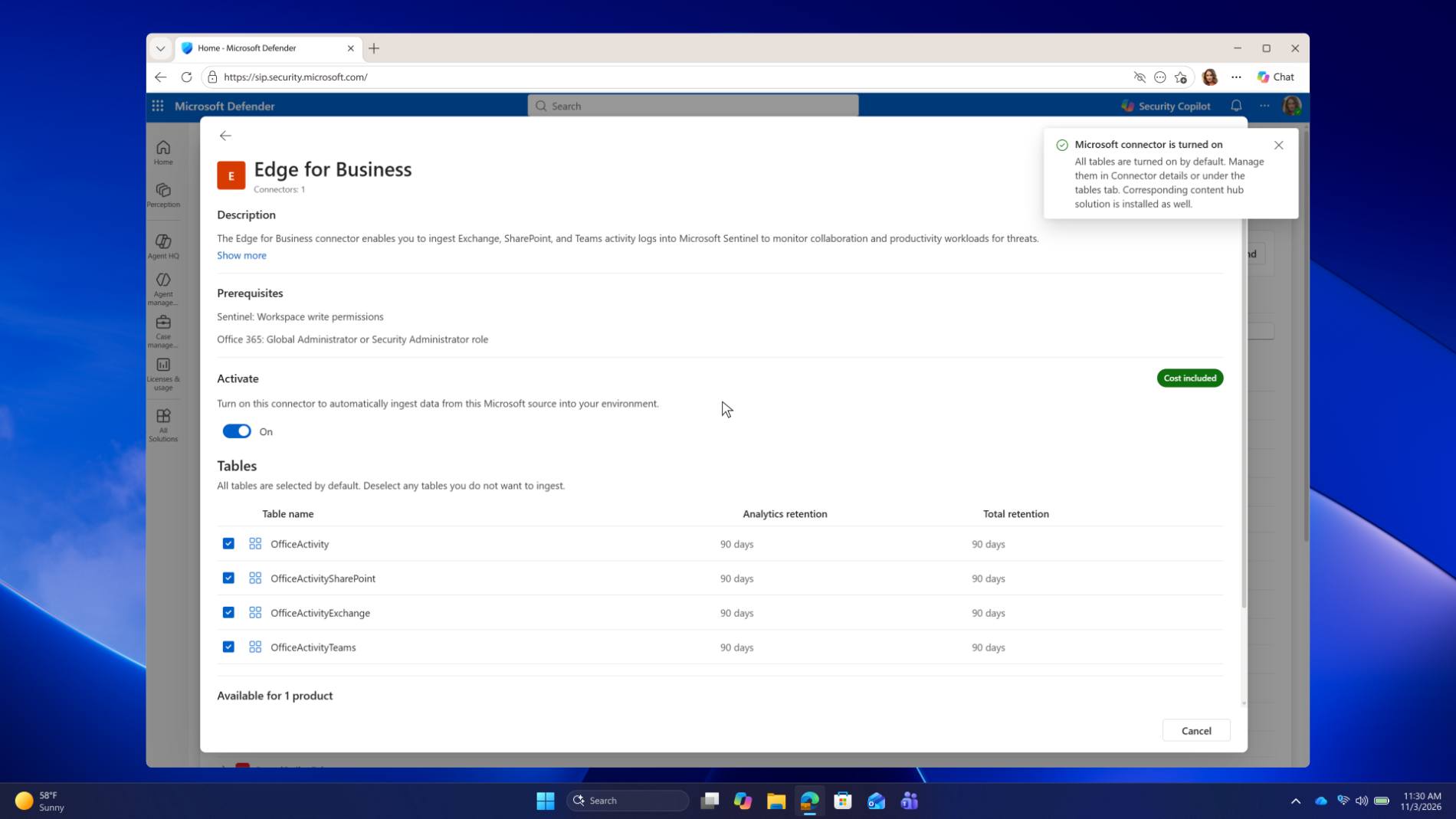
Available in preview. Requires Microsoft Sentinel licensing.
Access private web apps without a separate VPN client
At a glance: Microsoft Entra Global Secure Access in Edge for Business lets users reach private web apps with just their work profile, no VPN client required.
VPN and VDI have been the traditional solutions for secure access to private company web apps from a personal laptop. This requires software installation, extra user steps, and another client for IT to support.
Microsoft Entra Global Secure Access in Edge for Business lets users reach approved private web apps simply through their signed-in Edge work profile, skipping a separate VPN or access client altogether. IT targets the access path and Global Secure Access policies to employees’ work accounts. Work identity is now the key to secure private access.
Available in preview. Requires Microsoft 365 E7 license.
Reduce sensitive information exposed on screen
At a glance: Redaction leak control in Edge for Business blurs sensitive information on protected pages, and users can reveal it when needed.
In call centers and other shared environments, IT needs to obscure sensitive on-screen data without blocking legitimate access or disrupting work. Redaction leak control visually blurs supported sensitive information on data loss prevention-protected pages. Users can reveal a value when needed, then hide it again.
Available in preview with Microsoft 365 E5 license.
Easily turn release notes into action
At a glance: AI insights in the Edge management service turns release notes into tailored recommendations for your tenant.
Release notes can be dense, but you need to know which browser policies affect your environment. AI insights in the Edge management service summarizes the latest release notes and recommends next steps for your tenant.
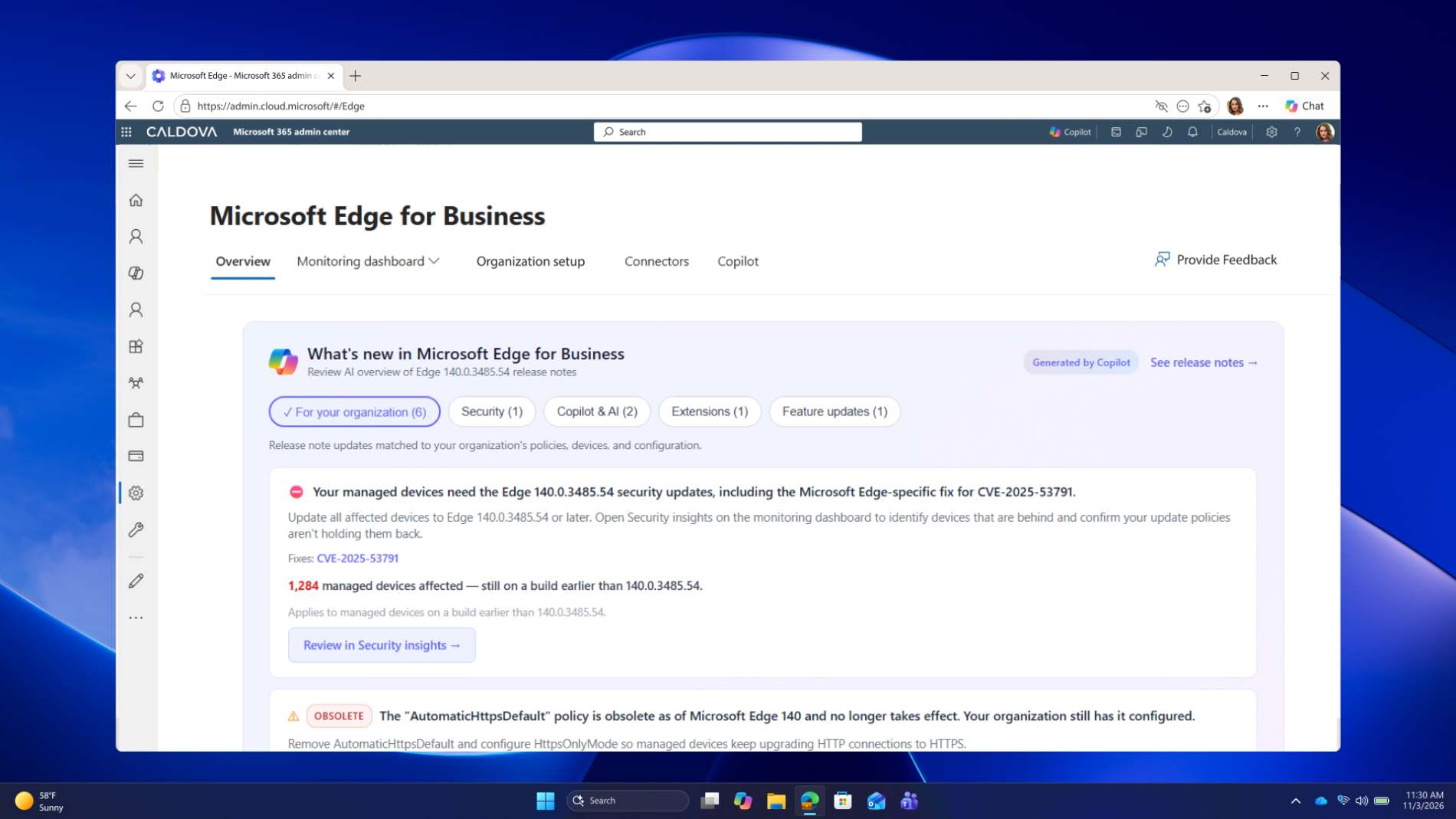
Available in preview with no additional licensing required.
Browser security, strengthened by our partner ecosystem
We’re expanding our focus to support MSPs, who do critical work managing security for small and medium-sized businesses. We’re also helping customers build on their existing security investments—not just Microsoft’s. Our connector program helps bring the security tools you already use into the browser—and we’re expanding support across more platforms.
Manage browser policies across customer tenants with inforcer
At a glance: Through inforcer, MSPs can apply a recommended Edge for Business security baseline across multiple customer tenants on Windows and macOS.
For MSPs, managing browser policies customer by customer takes time and can lead to settings drift. Edge for Business is introducing a recommended browser security baseline with inforcer, built on Microsoft and CIS security guidance and inforcer’s experience across real MSP tenants. In inforcer, MSPs can apply the managed baseline across multiple tenants and choose how strictly to align each, or build their own.
This not only saves time but also gives MSPs a foundation for managed browser security offerings. The baseline supports Windows and macOS, and each customer tenant requires a Microsoft Intune license.
Multi-tenant browser policy configuration through inforcer is generally available.
Extend partner security connectors to macOS, iOS, and Android
At a glance: Edge for Business’ reporting connectors now support macOS, iOS, and Android, and device trust connectors now support macOS.
The Edge for Business connector ecosystem enables you to bring the security tools you already use into the browser. Now, we’re extending that reach to more platforms.
Our reporting connector now supports macOS, Android, and iOS in addition to Windows, with partners including Devicie. This gives IT teams a more complete view of browser activity across devices, helping ensure consistent monitoring and policy enforcement.
We’re also expanding secure access. The device trust connector now supports macOS in addition to Windows, with partners including Cisco Duo and Omnissa.
Visit Reporting connectors and Device trust connectors to learn more.
Bring Akamai Workforce Protector policies to iOS and Android
At a glance: Organizations using Akamai Workforce Protector can now apply its AI, data loss prevention, and web security policies in Edge for Business on iOS and Android.
Organizations using Akamai Workforce Protector can now apply the same AI usage, web and SaaS data loss prevention, and web security policies in Edge for Business on managed iOS and Android devices. IT deploys the extension through policy, so protection follows employees to mobile in Edge for Business.
Read the announcement from Akamai
How should IT teams get started? It’s EZ.
At a glance: To get started with Edge for Business, go to aka.ms/ConfigureEdgeEZ and choose a guided path for configuring common scenarios.
You don’t need a multi-year plan to improve your browser security posture. Do just one thing: go to aka.ms/ConfigureEdgeEZ. Choose a common browser security scenario, and follow a guided path for configuration.
You’re doing critical work behind the scenes. We see you. We’re here to make it easier for you.
1 Source: “The State of Workforce Security: Key Insights for IT and Security Leaders”, Omdia, 2025.
2 Based on worldwide share of browser minutes of use on Windows devices at organizations with more than 1,000 employees. Windows is the world’s most widely used enterprise PC operating system.