
As AI agents become more capable, they promise substantial productivity gains across enterprise workflows. At the same time, they can collapse familiar execution boundaries and introduce new risk paths—from agent to human, agent to agent, agent to tools, and agent to applications. That tension can leave organizations facing an unacceptable choice: give agents broad access and hope nothing goes wrong or block them and forgo the value they can deliver.
Traditional application controls remain essential, but they were not designed to express the full context of an agent’s execution across tools, child processes, files, network endpoints, and long-running sessions.
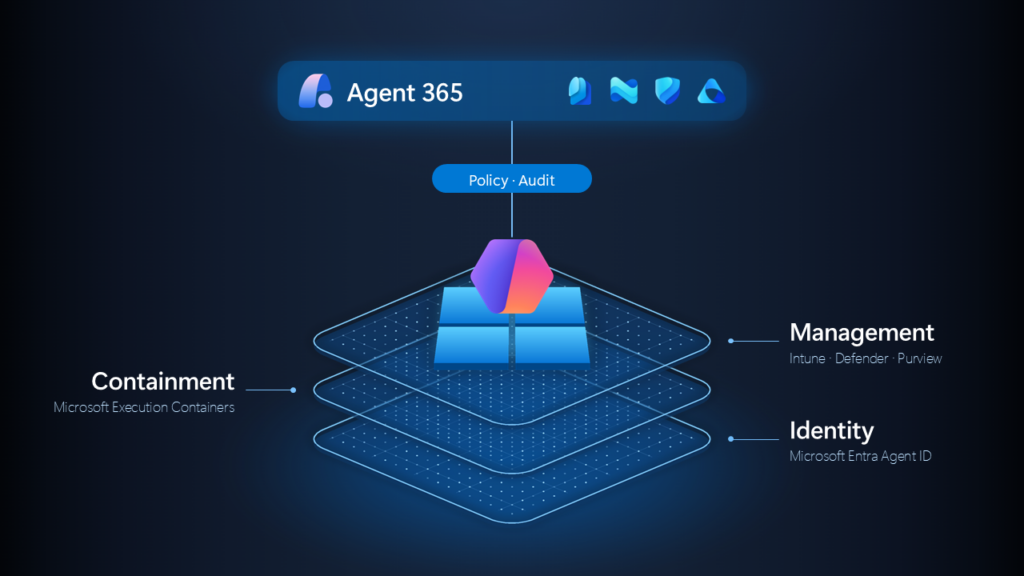
Running agents safely at enterprise scale requires three foundational operating-system primitives: identity, containment, and manageability.
Identity
When an agent operates on a user’s behalf, its actions must be distinguishable from the user’s own activity. Agent identity creates this separation, making agent activity identifiable so organizations can apply appropriate security, access, and governance controls.
Windows and Microsoft Entra are working together to support agent identity across local and cloud interactions. Microsoft Entra Agent ID provides the identity foundation for governing agent access to resources, while Windows provides the local isolation boundaries that help separate agent activity from the user.
Containment
Containment limits agent behavior to only the resources required for the assigned task. Microsoft Execution Containers (MXC) provide platform-enforced boundaries for this control.
For example, if an agent is asked to build a website, it should access the project folder only, not personal files or unrelated sensitive data. MXC enforces those boundaries through Windows platform controls, not just policy guidance.
Different agent patterns require different containment strength. A coding assistant may need lightweight process isolation, while a fully autonomous agent may require stronger isolation, including separate Windows sessions. Windows provides this containment spectrum so isolation can be matched to workload risk.
Management
Organizations need centralized visibility and control over agent deployment, access, and policy enforcement. Windows connects agent operations to the Microsoft security and management ecosystem.
- Microsoft Intune and other MDM solutions define and manage agent containment, configuration and compliance policy.
- Microsoft Entra governs identity, authentication, and access.
- Agent 365, Microsoft Defender, and Microsoft Purview extend observability, security, and management into agent activity workflows.
Why identity is foundational
Identity is the control anchor across all three domains. It establishes which agent is acting, enables the correct containment model, and carries policy context into interactions across devices, applications, and cloud services.
The target state is consistent governance across endpoint and cloud, rather than fragmented controls.

Where Microsoft Execution Containers (MXC) fits in an enterprise agent-security strategy
Microsoft Execution Containers (MXC) should be treated as a key layer in a defense-in-depth architecture, as it connects with identity, endpoint, data, or application controls.
Its distinctive role is to govern execution: which resources a local agent process can reach, and how strongly the workload is isolated. This closes the gap between granting a user access and constraining what an agent running on that user’s behalf can do.
The strongest design separates responsibilities across the control plane:
- Identity and access with Microsoft Entra Agent ID: Agent identity helps distinguish agent activity from a user’s own activity so organizations can apply appropriate access, security, and governance controls. Microsoft Entra Agent ID provides the identity foundation for supported agent scenarios, including identifying agent activity and enabling access controls as agents interact with cloud resources. On Windows, local security boundaries can further isolate an agent’s processes and resource access from the user. Together, these capabilities help organizations distinguish and govern agent activity across local and cloud interactions, with support varying by agent and scenario.
- Local agent containment with Microsoft Execution Containers (MXC): MXC is the policy-driven containment layer. Agents who adopt it run supported execution inside an OS-enforced boundary. MXC applies runtime controls over what the agent can read/write (for example, local files), which resources it can call, and what requests or results can flow to permitted endpoints and MCP servers.
- Securing AI on the endpoint with Microsoft Intune: Intune delivers MXC containment policy for managed Windows devices, so agent workloads run within enterprise-defined boundaries. Intune also governs agent access to company resources through device compliance, protects work data with app protection policies for supported agents, restricts unauthorized agents, and applies policy to enable Microsoft Defender runtime protection.
- Local-agent discovery, runtime protection, and investigation with Microsoft Defender: Microsoft Defender discovers supported local agents and provides endpoint context, including associated users, devices, processes, and configured MCP connections. Runtime protection helps detect and block malicious instructions and tool interactions in supported agent workflows, while alerts and investigation capabilities help security teams understand and respond to threats.
- Data loss prevention for local agents with Microsoft Purview: Microsoft Purview extends data loss prevention policies to supported local-agent interactions, including prompts and tool calls, helping organizations detect and block inappropriate sharing of sensitive information. This enables organizations to apply data protection policies as agents work with enterprise information.
- Bring local AI agents under management with Microsoft Agent 365: As organizations adopt local AI agents, they need a consistent way to understand where agents are operating, what they can access, and which ones are authorized. Microsoft Agent 365 brings supported local agents and their MCP connections into a unified Agent registry, giving administrators visibility into their AI estate and the tools agents use. With Dynamic Agent Risk, agent templates, and integrated Microsoft security controls, organizations can prioritize risks, apply governance policies at scale, bring approved agents under management, and restrict unauthorized agents.
Prepare before you deploy
Begin with an inventory of the current state of your enterprise’s agent use. This includes what agents are operating in the enterprise today and under what identities and credentials, who is using agents, what they are using agents for (types of workloads), the tools and plug-ins each type of workload invokes, the files and directories it touches, and the network destinations it calls.
A good starting point for this inventory is the Agent 365 Registry, which includes an inventory of agents in your enterprise. To address technical readiness, inventory and align with prerequisite OS and software versions.
For each workload, document four views:

- Business objective: the user outcome and why agent access is required.
- Execution model: how work is performed across process flows, tools, commands, files, and endpoints.
- Control boundaries: where identity context, data sensitivity, network exposure, or administrative privilege changes require controls.
- Operating readiness: required OS and agent versions, management settings, security policies, deployment groups, support readiness, and rollout governance.
This framing prevents a frequent implementation pitfall, where policy is treated as the full deployment. In practice, successful rollout also requires version eligibility, tenant configuration, security-group design, endpoint-security alignment, communications, support routing, rollback planning, and formal change-management approval.
Roll out Microsoft Execution Containers (MXC) progressively
1. Observe Before Enforce (Policy Evidence Phase)
Least-privilege policy design is hard when you do not yet know every resource an agent workload needs. This phase exists to close that gap. On Windows, MXC process containment can generate activity evidence that shows what the workload attempted to access, so teams can refine policy before production enforcement.
Use this phase to capture real operating behavior, not only a scripted happy path. Include first-run setup, authentication, updates, error recovery, and low-frequency workflows.
MXC now supports three operating states during policy development:
- Enforcement: ungranted access is blocked; no activity report. Use when running production policy.
- Learning – enforced + recorded: ungranted access is blocked and recorded in an activity report. Use to diagnose containment failures and confirm only required access is granted.
- Permissive – allowed + recorded: access that policy would deny is allowed but recorded. Use in controlled pilots to observe behavior without interrupting users.
Treat the collected data as policy evidence, not as auto-approval. Review with workload owners and security teams, remove incidental access, separate required from optional behavior, and investigate unexpected destinations or tools before converting observations into rules.
Current scope: this capability is currently available for Windows process-contained workloads via the MXC SDK. Outputs help author policy for file, registry, clipboard, and UI access. Additional resource activity may appear in detailed logs without direct policy mappings, and some failures may not be logged, so always validate workload behavior with containment enabled before rollout.
2. Develop the minimum policy that supports the workload
Translate validated activity into least-privilege policy. Prefer explicit access to the folders, domains, and tools the workload requires. Keep policy modular so a risky capability can be adjusted without reopening the entire environment. Record the rationale, owner, review date, and emergency rollback for every exception.
3. Validate in deployment rings
Use rings that increase both scale and diversity. A practical pattern is:
- Ring 0 — technical validation: limited number of users operated by the deployment team; prove assignment, version checks, telemetry, exclusion, and rollback.
- Ring 1 — informed early adopters: limited number of users close to the workload; validate real tasks and support documentation.
- Ring 2 — limited production: increased scale of users across representative device and network conditions.
- Ring 3 — broad deployment: expand only after success criteria and support capacity are met.
Define promotion criteria before each ring begins. Include installation and policy-assignment success, task completion, performance, alert volume, help-desk contacts, confirmed rollback, and the absence of unresolved high-severity security issues.
4. Match enforcement to confidence
Treat containment posture as a lifecycle decision. Early-stage workloads often have unclear dependency patterns, so start them in an observe-first posture to gather evidence and reduce disruption. As behavior becomes predictable and policy coverage is proven, promote those workloads to full enforcement. For mission-critical workloads, predefine a break-glass fallback (for example, temporary permissive mode) so operations can continue if a policy issue unexpectedly blocks business work. That fallback must be tightly governed: limited duration, explicit approval, full logging, post-incident review, and a named owner accountable for returning to enforcement. This keeps continuity without turning exception handling into a standing loophole.
5. Preserve an opt-out and rollback path
Test exclusion as a first-class deployment feature. Confirm that removing a user or device from assignment removes the intended settings and that previous values return to the expected state. Document whether groups are user- or device-based, who can modify membership, propagation time, and what users should do while rollback completes.
Create and distribute Microsoft Execution Containers (MXC) policies through your endpoint and mobile device management (MDM) system
Your endpoint management service or mobile device management (MDM) system is an enterprise distribution point for MXC policy. It turns the containment decisions developed from the observe-before-enforce evidence phase into managed configuration that can be assigned, validated, expanded, and rolled back consistently across eligible Windows devices.
Build the policy
In the MDM admin center, select the agent, then configure it to run in an MXC container, define approved file-system locations with read or write permissions, and set network access. Before assignment, confirm that targeted devices run an MXC-capable Windows build and that the supported agent version is installed.
Use observations from the observe-before-enforce evidence phase, not as a complete policy specification, but as signal. Its results can help create file, registry, clipboard, and UI access policies; other recorded activity does not map directly to policy settings, and some resource failures are not logged. Review the file paths, network destinations, and tools required for validated workflows, then configure the applicable supported controls and test the workload with containment enabled. Keep exceptions explicit, owned, and reviewable. Where the management experience supports it, separate policy modules so an organization can change one resource boundary without reopening every permission.
Configure MXC with Intune (Private Preview)
-
Define the containment objective
- Decide which agent workloads the policy should cover (all MXC-capable agents, or a specific agent such as GitHub Copilot CLI).
- Set the principle of least privilege for file, network, and tool access. Treat Intune MXC policy as the enterprise ceiling for access. User/session guardrails may be available within agents, so users can further scope access within IT-defined limits.
-
Scope policy in Intune
- Create an MXC containment policy in Intune.
- If needed, scope by agent so one policy applies only to a named agent workload.
-
Configure file system boundaries
- Allow read/write and read-only access as appropriate to locations needed for work, troubleshooting, context or agent functioning (e.g. the agent’s own install path, script execution tools).
- Deny access to sensitive locations (for example, corporate OneDrive folders, program files, core system files).
-
Configure network and runtime controls
- Define allowed and blocked network destinations.
- Configure whether permissive operation is allowed for approved diagnostic/pilot scenarios.
-
Publish and validate policy
- Assign it to the target device/user groups (pilot first, then broader deployment rings).
- Confirm policy applies successfully on eligible Windows devices.
- Validate that normal development workflows still function inside approved boundaries.
-
Verify expected developer behavior
- Inside approved write scope : agent can inspect and modify files.
- Outside approved write scope: agent can read but cannot modify them.
- Denied sensitive paths: access attempts are blocked
-
Operate as a controlled lifecycle
- Start with pilot assignments, monitor outcomes, then expand by ring.
- Keep exception paths explicit, time-bound, and approved.
- Roll back assignments if a policy change impacts business-critical workflows.
This model gives IT OS-level guardrails on agent behavior while preserving productive developer workflows in approved boundaries.
Package the complete deployment
Microsoft Intune policy is only one part of the MDM deployment. Coordinate the following assignments and prerequisites:
- Agent readiness: deploy or update the supported agent version and use detection logic to identify eligible installations.
- MXC configuration: assign container execution, file access, network access, and related managed settings.
- Security configuration: deploy Microsoft Defender AI agent runtime protection settings through supported Microsoft Intune or other MDM policies or centrally managed scripts, as appropriate for the selected inspection method. More information on how here: https://learn.microsoft.com/en-us/defender-endpoint/configure-ai-agent-runtime-protection#deploy-settings-throughout-your-organization-with-microsoft-intune
- Operations: publish user communications, support guidance, diagnostics, escalation ownership, and rollback instructions before promotion.
Validate delivery before expanding
Use Microsoft Intune or other MDM reporting to confirm that targeted eligible devices received and applied the policy. Validate the effective MXC behavior on representative endpoints, not merely that assignment succeeded. Test normal workflows, expected denials, agent-version sequencing, exclusion, and rollback. A production gate should require reliable policy application within the organization’s standard MDM service levels and evidence that administrators can create, assign, and validate the policy without engineering assistance.
Monitor agent activity and respond through Microsoft Defender and Microsoft Purview
After Microsoft Intune or other MDM distributes the policy, Microsoft Defender and Microsoft Purview provide complementary operational views. Defender focuses on agent inventory, runtime threats, alerts, investigation, and endpoint response. Purview applies data loss prevention controls when an agent handles sensitive information. Together with MXC execution telemetry, they help security teams distinguish malicious activity, incomplete policy, product defects, and expected limitations.
Use Microsoft Defender for runtime protection and investigation
Onboard eligible devices to Microsoft Defender for Endpoint, keep Microsoft Defender Antivirus and security intelligence current. Ensure Antivirus is running with real-time protection enabled. Enable AI agent runtime protection using agent-native event inspection, network inspection, or both, according to the target agent’s supported inspection methods. Begin in Audit mode for early rings so activity is inspected and reported without interrupting the agent. After validating alert quality and workflow compatibility, move mature rings to Block mode. In Block mode, Defender stops supported malicious activity and can notify the user in the agent and through Windows Security.
Confirm that local agents appear in the Defender local AI agent inventory. For an investigation, review the agent record, device timeline, related incident, initiating user, process tree, network activity, and protection state. Use Advanced Hunting where deeper correlation is required. The rollout should demonstrate that a prompt-injection attempt or other supported malicious behavior produces the expected alert in Audit mode and is prevented in Block mode.


Use Microsoft Purview to protect sensitive data
Configure Microsoft Purview Endpoint Data Loss Prevention for supported local agents. Define the sensitive information types and agent interactions the organization needs to govern, scope the policy to the intended agents and endpoints, and choose an enforcement action. Purview can evaluate sensitive data used in prompts, tool invocation, and tool output where supported. A matched rule can block the interaction and explain to the user that organizational data-protection policy prevented the action.
Start with a controlled test policy—for example, blocking a test sensitive-information pattern for the target agent—then wait for policy synchronization and verify the effective policy on the endpoint before testing. Exercise both direct prompt sharing and agent access to a test file. Expand the rule only after confirming that detections are accurate and that legitimate workflows remain usable. Keep policy creation centralized; endpoint enablement and policy receipt should be validated per device, but administrators should not recreate the Purview policy on every endpoint.

Define the response loop
- Detect: receive an MXC denial, Defender alert, Purview DLP event, or anomalous behavior signal.
- Establish context: identify the agent, user, device, process chain, tool, file or data type, network destination, and effective protection mode.
- Classify: determine whether the event is malicious, an expected workflow blocked by incomplete policy, a product or capability gap, or a by-design limitation.
- Contain: use Defender endpoint response, Purview enforcement, identity controls, MXC policy, or MDM group exclusion as appropriate.
- Correct and validate: adjust the workload or policy, retest in a lower ring, and confirm the expected Defender and Purview evidence before redeployment.
- Learn: update the inventory, policy rationale, support article, detection logic, and ring-promotion criteria.
Before broad deployment, train the security operations and support teams on AI-agent alert triage and incident response. Document ownership for installation failures, MDM assignment issues, OS compatibility, agent defects, MXC denials, Defender alerts, and Purview policy matches. The support article should include prerequisites, common symptoms, diagnostics, protection states, rollback steps, and the escalation route.
End-to-end deployment example: GitHub Copilot CLI
Consider a managed rollout of GitHub Copilot CLI with MXC protections. The enterprise begins by identifying the supported Windows build and the oldest GitHub Copilot CLI release it will allow for rollout. It then enables GitHub Copilot CLI and its managed settings for the GitHub enterprise, creates target and opt-out groups, and validates the required identity and security settings. Endpoint management then assigns the CLI configuration and MXC policy to a small test group.
The team exercises representative workflows in Learning Mode, including repository access, shell commands, tool invocation, authentication, network calls, update behavior, and failures. Reviewers convert legitimate activity into a least-privilege policy and investigate anything unexpected. They confirm that unsupported devices are handled safely, that eligible devices receive the intended configuration, and that exclusion reverses assignment.
After technical validation, the team expands to informed early adopters, then to a limited production cohort, and finally to broad deployment. At each gate, it reviews reliability, task success, performance, alerts, support contacts, and unresolved blockers. Native endpoint-management policy replaces temporary scripts wherever possible, and every ring has a documented rollback and support route.
If your company is using Codex by OpenAI, you can read their guidance on enabling MXC and Windows deployment.
Operational checklist
- Inventory agents, workloads, tools, identities, files, endpoints, and child processes.
- Confirm OS, agent, and management prerequisites on representative devices.
- Define the roles of MXC, endpoint management, identity, endpoint security, data security, and service governance.
- Create target and opt-out groups; document membership and propagation behavior.
- For workloads using Windows process containment through the MXC SDK, start in Learning Mode and exercise normal, edge, and failure workflows; confirm that the agent works with containment enabled before rollout.
- Review observed activity and author least-privilege policy with owners and rationale.
- Define ring audiences, promotion criteria, pause criteria, and rollback steps.
- Validate native policy availability in the production management tenant.
- Confirm Microsoft Intune or other MDM assignment and effective MXC configuration on representative eligible devices, including required agent-version detection and update sequencing.
- Align security settings and monitoring before increasing scale.
- Publish user communications, a support article, diagnostics, and escalation routing.
- Verify opt-out and rollback in Ring 0.
- Review telemetry, alerts, performance, task success, and support volume at every gate.
- Keep uncertain workloads observable; enforce where confidence is sufficient.
- Time-box permissive fallbacks and review every use.
- Run a post-deployment review and update the reusable playbook.
Govern agents at scale
Secure agent adoption is not a choice between moving quickly and applying control. The practical path is progressive: observe real behavior, turn evidence into policy, enforce in measured steps, and preserve a safe way to recover.
MXC provides the execution boundary, while the surrounding enterprise stack paired with Windows supplies identity, distribution, detection, data protection, and operations. When those layers are planned together, organizations can move agents from experimentation to dependable production use—and repeat the process for the next workload.