
TL;DR: Single-stack IPv6 on GKE runs both nodes and pods without having to use private IPv4 addresses. Available in preview for Cloud TPU v6e and CPU node pools, including Axion, it works with DNS64/NAT64 to reach IPv4 endpoints.
Long before they run out of compute or power, AI applications hit another wall: running out of IP addresses. A single AI deployment often requires a vast address space to support everything from thousands of accelerator nodes, scaling inference replicas, bursting Ray workers and pipelines, pod sidecars, and services like vector databases. Running a dual stack — IPv6 behind a private IPv4 space — can help, but only to a point, because the private IPv4 space has often already been exhausted across existing networks.
To help, today, we’re announcing single-stack IPv6 on Google Kubernetes Engine (GKE), allowing you to run both nodes and pods on IPv6, without private IPv4 addresses. Single-stack IPv6 is available in preview for Cloud TPU v6e and CPU node pools, including Axion, and works with DNS64/NAT64 to reach IPv4 endpoints.
Nodes and pods run IPv6-only across Cloud TPU v6e and CPU-based node pools, with no private IPv4. Workloads reach Google Cloud APIs over native IPv6 and IPv4-only endpoints through DNS64/NAT64.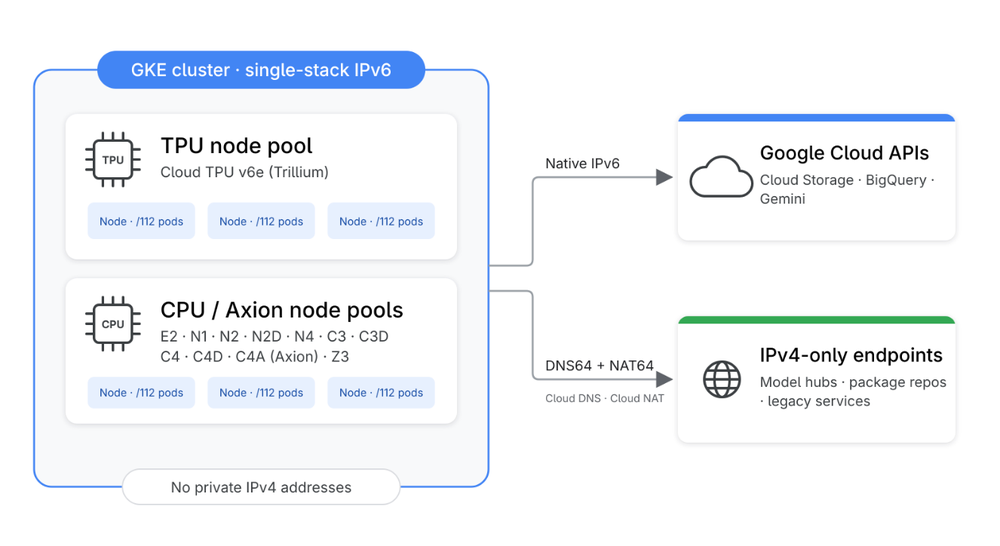
What single-stack IPv6 delivers
The availability of single-stack IPv6 in GKE is a game-changer for large AI deployments. Consider the following features and benefits that it brings to the table:
1. No private IPv4 required for nodes or pods
Nodes and pods use IPv6 exclusively. Without the RFC 1918 footprint that governs private IPv4 address spaces, clusters avoid conflicts with on-premises networks, peered VPCs, or adjacent clusters.
2. IPv4 interoperability with DNS64/NAT64
You enable DNS64 on the VPC, and NAT64 on a regional Cloud NAT gateway, allowing pods to transparently reach IPv4-only endpoints, registries, and dataset hubs — refer to the documentation to learn how to configure DNS64 and set up Cloud NAT.
3. Massive address space per node
Each node receives a /112 pod range (65,536 addresses), so IP address capacity no longer limits how high your clusters, nodes, or pods can scale. Standard GKE maximum-pods-per-node limits still apply.
4. Broad accelerator and compute support
We designed single-stack IPv6 in GKE with the goal of supporting a range of accelerators and general compute families. At preview, it supports Cloud TPU v6e (Trillium), plus E2, N1, N2, N2D, N4, C3, C3D, C4, C4D, C4A, and Z3 machine families, with support for additional accelerators and machine families coming soon.
5. Direct workload observability
Every pod has a unique IPv6 address without having to run NAT inside the cluster, simplifying telemetry, network policies, and debugging.
Performance and scale
Single-stack IPv6 removes private IPv4 address limits without additional data plane overhead. In our internal testing, we saw the following performance characteristics:
-
Pod lifecycle: Burst pod scheduling and CNI sandbox setup performed at parity with IPv4.
-
Networking: Inter-node TCP/UDP latency and multi-stream pod-to-pod throughput matched IPv4.
-
Services and DNS: eBPF service load balancing and NodeLocalDNS showed no measurable overhead compared to standard IPv4.
Start building today
Single-stack IPv6 is available now in preview on GKE version 1.37.1-gke.3020000
To create your first IPv6-only cluster, run the following commands, replacing REGION and CLUSTER_NAME:
- code_block
- <ListValue: [StructValue([('code', '# 1. Create a VPC with internal (ULA) IPv6 enabledrngcloud compute networks create gke-ipv6-net \rn –subnet-mode=custom \rn –enable-ula-internal-ipv6rnrn# 2. Enable DNS64 for the VPCrngcloud dns policies create gke-ipv6-dns64 \rn –networks=gke-ipv6-net \rn –enable-dns64-all-queriesrnrn# 3. Enable NAT64 in your regionrngcloud compute routers create gke-ipv6-router \rn –network=gke-ipv6-net –region=REGIONrngcloud compute routers nats create gke-ipv6-nat64 \rn –router=gke-ipv6-router –region=REGION \rn –auto-allocate-nat-external-ips \rn –nat64-all-v6-subnet-ip-rangesrnrn# 4. Create the clusterrngcloud beta container clusters create CLUSTER_NAME \rn –cluster-version=1.37.1-gke.3020000 \rn –location=REGION \rn –enable-dataplane-v2 \rn –cluster-dns=clouddns \rn –stack-type=ipv6 \rn –network=gke-ipv6-net \rn –create-subnetwork name=my-subnet \rn –ipv6-access-type=internal'), ('language', ''), ('caption', )])]>
To learn more, see the documentation.