Building cloud solutions with autonomous AI agents should feel fast, safe, and reliable. Without cloud-specific context, coding agents often struggle. They might invent deprecated SDK syntax, guess invalid command flags, or attempt operations without the required Identity and Access Management (IAM) permissions. Even worse, an unguided agent can enable billable APIs or provision cloud resources without your explicit permission.
Starting today, you can install the google-cloud-developer plugin directly from the Antigravity Marketplace in the Build with Google section. This plugin equips Antigravity with foundational skills, safety guardrails, and live documentation grounding for building on Google Cloud. If you’ve never installed a plugin using the marketplace before, you can refer to the Antigravity documentation.
Configuration is straightforward. The bundled Developer Knowledge Model Context Protocol (MCP) server is pre-authorized by default. You don’t need to configure API keys, exchange OAuth tokens, or edit any configuration files. You install the plugin, and your agent connects to official Google developer documentation immediately.
In this post, we’ll walk through what’s included in the plugin, how to install it with one click, and how it grounds your agent in live Google Cloud documentation.
Why use the Google Cloud Developer plugin?
Coding agents often rely on static training data. Cloud platforms update quickly, and models can produce code with outdated client libraries or invalid parameters.
The google-cloud-developer plugin solves this issue. It bundles curated skills, intelligent routing rules, and the Developer Knowledge MCP server into a single portable package.
The plugin provides three key benefits:
-
Live documentation grounding: The agent queries official Google Cloud documentation over streamable HTTP.
-
Safety and cost guardrails: The agent enforces least-privilege IAM patterns and it requires your consent before it enables billable APIs or modifying cloud infrastructure.
-
Environment awareness: The agent inspects your local environment, detects existing CLI configurations, and designs safe execution roadmaps before it runs commands.
What’s included in the plugin
The plugin pairs core baseline skills and live documentation grounding with an intelligent skill routing architecture. Rather than limiting your agent to a fixed set of capabilities, it acts as an extensible gateway that discovers and pulls specialized skills from Google on demand.
Bundled agent skills
The bundled skills provide essential day-one guardrails, live documentation grounding, and the dynamic discovery engine that unlocks the broader catalog:
-
finding-google-skills: Powers flexible skill routing by discovering and loading skills on demand from thegoogle/skillsrepository on GitHub. Rather than requiring you to research, install, and manage individual skills, it dynamically retrieves the exact instructions your agent needs for specialized tasks in real time. -
retrieving-developer-knowledge: Provides answers and code samples that are grounded in official Google documentation across Google Cloud, Firebase, Android, Web, and Gemini. -
gcloud: Enforces execution guardrails, validates syntax, and applies safety checks to Google Cloud CLI (gcloud) commands. It blocks accidental destructive operations and it keeps you in control. -
google-cloud-recipe-auth: Steers your agent toward secure authentication patterns. It enforces service identities and Application Default Credentials (ADC) while it blocks risky practices like downloading service account JSON keys. -
google-cloud-recipe-onboarding: Guides initial project setup, account onboarding, and billing verification. It audits project states before it attempts to activate services.
Pre-authorized Developer Knowledge MCP server
The plugin connects your agent to the Developer Knowledge MCP server. Typically, adding an MCP server requires manual API key handling. With the Antigravity Marketplace integration in the Build with Google catalog, this MCP server is pre-authorized: Antigravity manages the authentication transparently. Your agent connects to Google’s documentation server immediately after installation.
Smart routing rules: on-demand capability expansion
The plugin includes google-cloud-discovery.md, an active routing rule that works together with the finding-google-skills bundled skill. When your prompt touches specialized topics, the routing rule directs the agent to fetch the relevant skills from the public catalog as needed.
This dynamic routing keeps your agent fast and token-efficient. Instead of preloading dozens of niche skills that clutter the context window, your agent pulls in deep, specialized guidance only when your task requires it.
Install the plugin with one click
You can install the plugin through the Antigravity Marketplace UI or through your terminal.
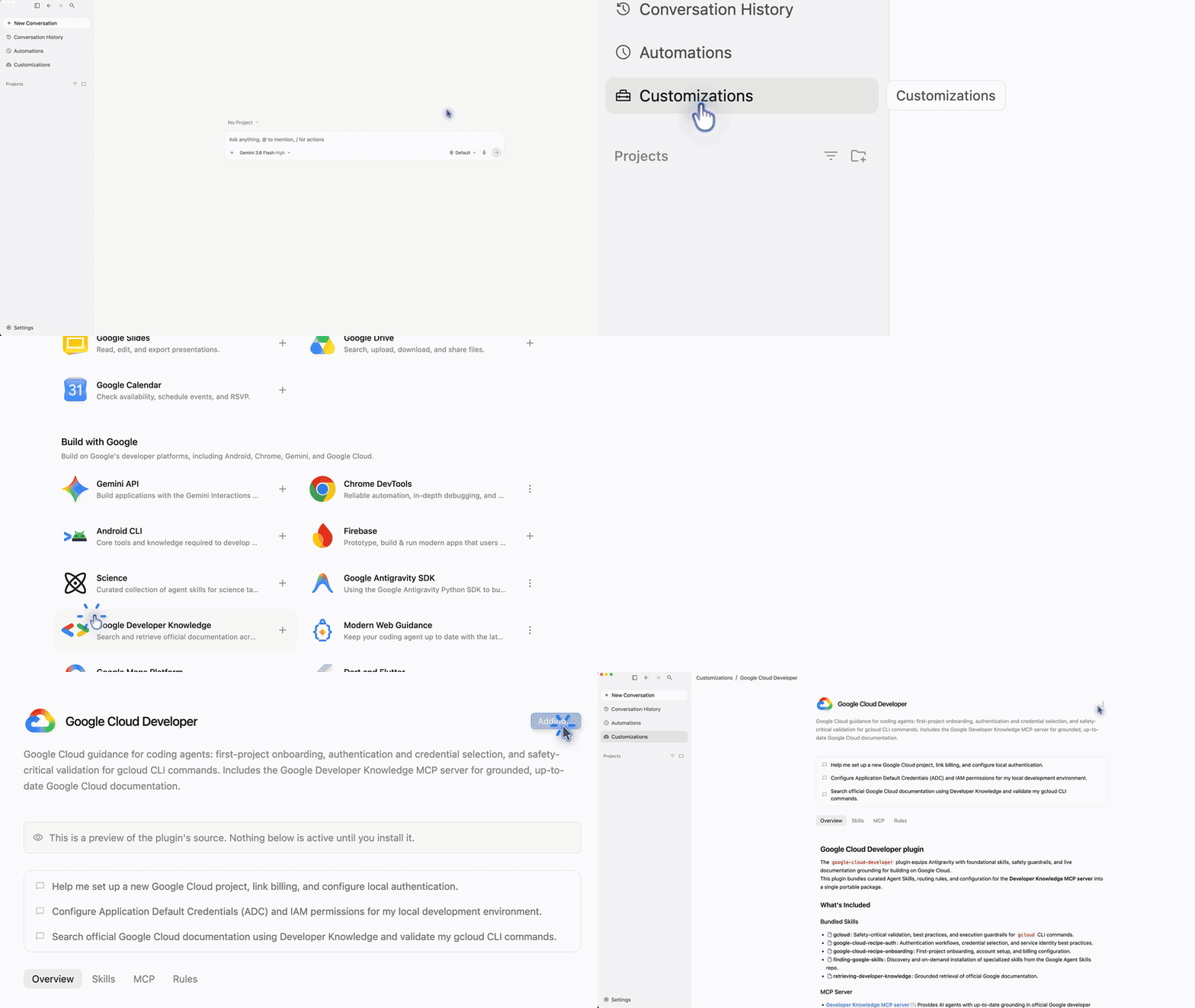
If you prefer the command line, install the plugin with a single command:
- code_block
- <ListValue: [StructValue([('code', 'agy plugin install google-cloud-developer'), ('language', ''), ('caption', )])]>
The CLI registers the skills and connects the Developer Knowledge MCP server immediately. You can also explore the plugin and skills directly on GitHub.
The plugin in action: Querying live documentation
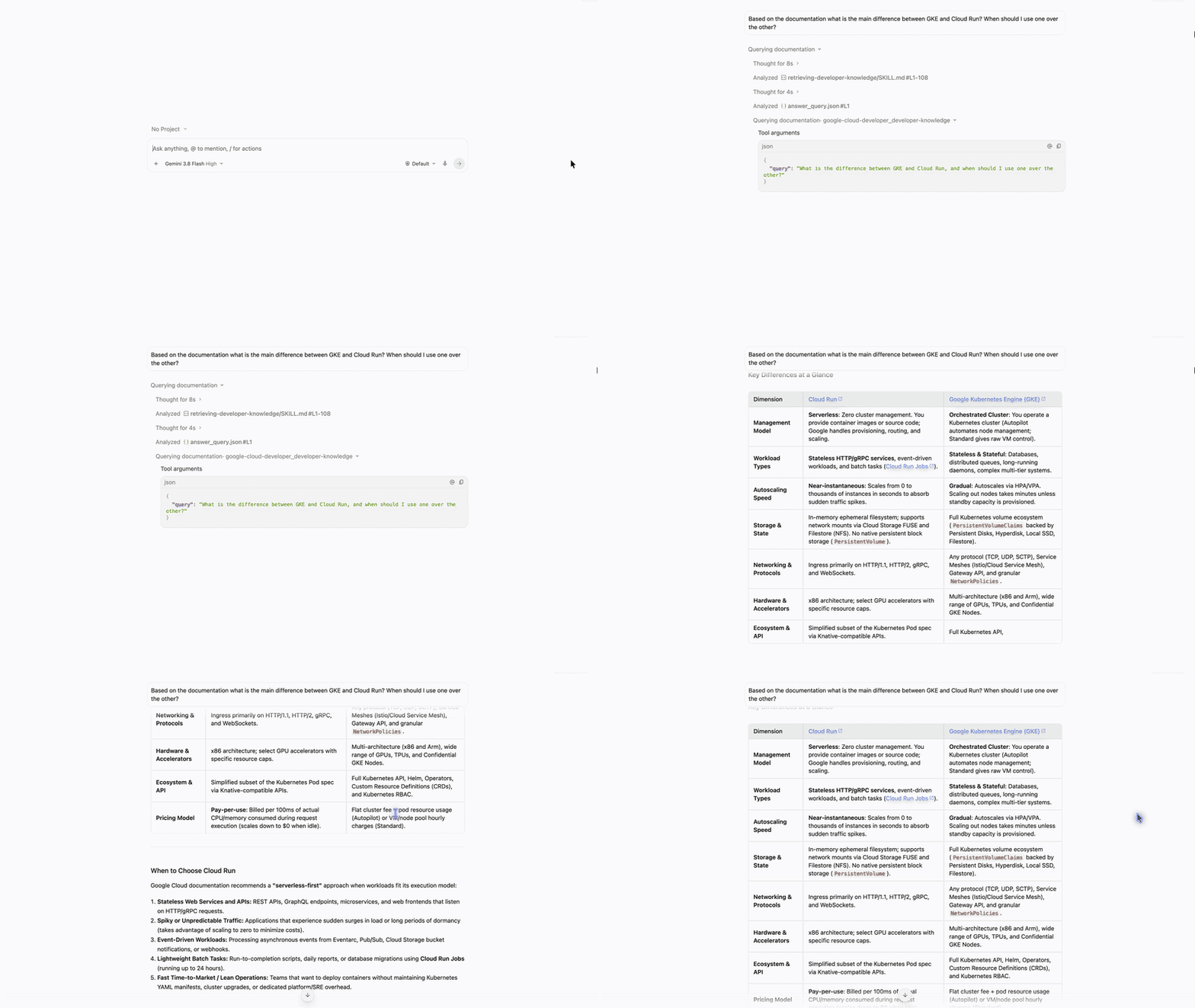
After the plugin is installed, your agent automatically grounds its answers in current documentation. You don’t need to prompt it with special syntax. Consider a practical query:
“Based on the documentation what is the main difference between GKE and Cloud Run? When should I use one over the other?”
Without the plugin, an agent might guess or provide outdated information. With the google-cloud-developer plugin active, the agent queries the pre-authorized Developer Knowledge MCP server: