
As many developers use agentic tools to create more code faster than ever before, the code has gotten more complex and they’re taking longer to find and fix software flaws.
Helping to address that pressure is a key concern at Google. We know that software development velocity is increasing, as much as 2x for some teams, and the average developer fix time for software flaws expanded from approximately 59 days a decade ago to more than 170 days in 2025, according to the Mandiant M-Trends 2026 Report.
To help you secure more code, more quickly, we’ve built CodeMender, our autonomous code-security agent that can find and fix software flaws at machine speed.
We also know that developer tools only succeed if they fit into existing routines. That’s why CodeMender, part of our AI Threat Defense platform, brings automated code fixes directly into the developer workflow. Today, we’re sharing this reference architecture that wires automated CodeMender remediation straight into Git pull requests via Google Cloud Run.
What the developer sees
Everything happens in the timeline. The scan posts one comment, a table of findings, each finding with an ID, and the two things you can type next.
Figure 1: A pull request triggers the scan on Cloud Run. Findings, exploit traces, and proposed patches all come back to the same timeline.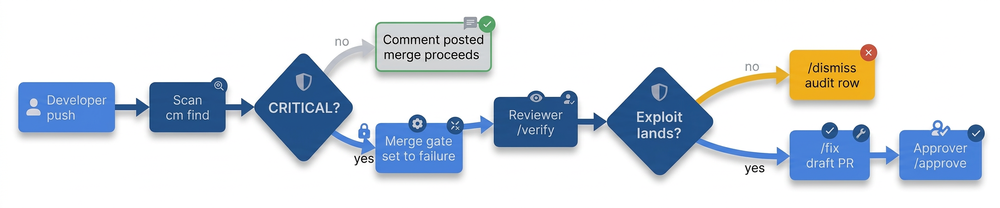
Reply /verify 612424da and the exploit attempt comes back in the thread, folded into a collapsible View Exploit Steps & Response Trace block so it doesn’t bury the conversation.
Reply /fix 612424da and the patch arrives the same way, behind Preview Proposed Code Diff, with a draft pull request already open /approve there. Both commands take all in place of an ID.
Figure 2: The initial scan comment provides a table of findings and the actionable slash commands, keeping the developer entirely within the pull request timeline.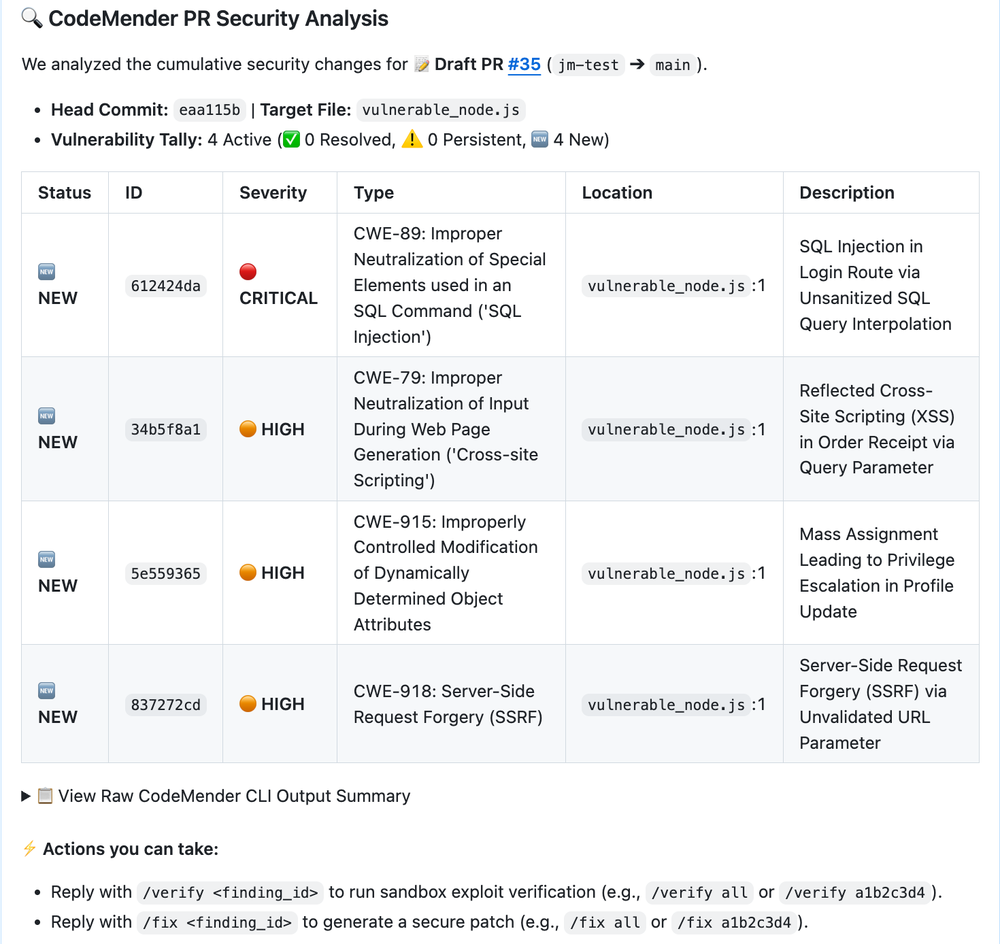
Nothing asks the developer to leave the pull request or learn a console.
Ship evidence, not just a severity
CodeMender cm find runs return a confidence score on the vulnerability finding during the code analysis. If the confidence score is below 100%, you can use cm verify to have CodeMender build and simulate an exploit in a sandbox to determine if the vulnerability is actually exploitable.
The simulation results can change the severity. Because the verification sandbox is ephemeral, the pipeline automatically streams these artifacts to Google Cloud Storage to preserve an audit trail for compliance and security operations reviews.
Figure 3: The /verify command returns a trace of the sandboxed exploit attempt, giving reviewers actionable evidence rather than abstract alerts.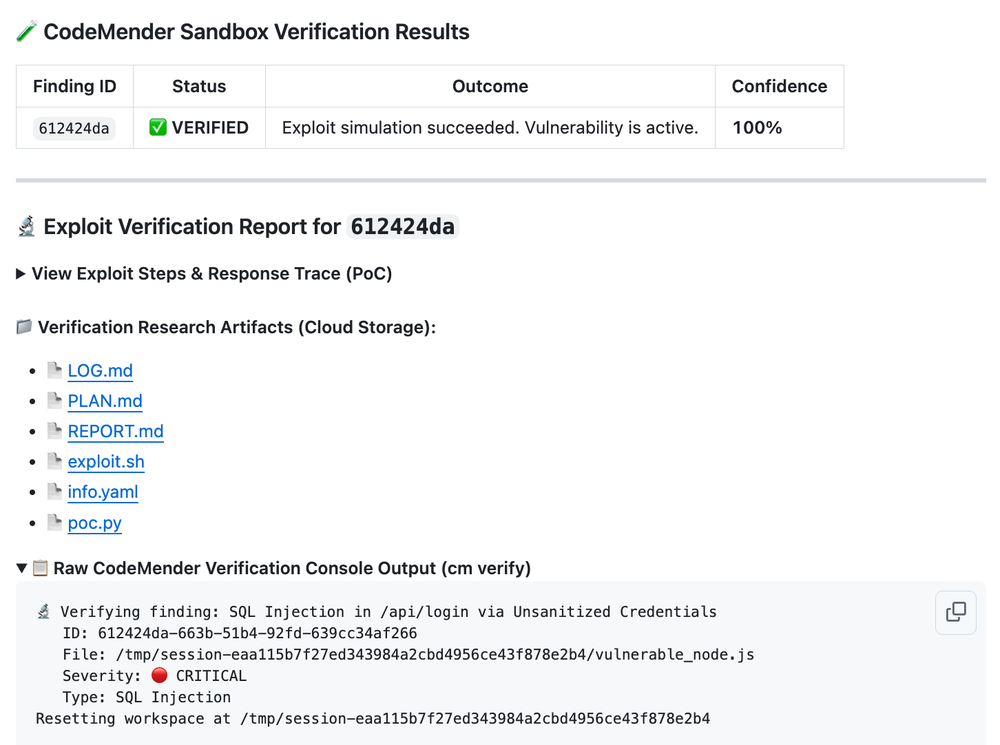
Engineer for failure modes in your verification pipeline. If your harness only searches for a successful exploit string, then any test failure — such as a crashed mock server or an execution timeout — can cause the pipeline to fail open and mistakenly label a real vulnerability as safe.
Ensure your parser separates true negative results from test crashes. If an exploit fails to complete cleanly, flag the status as inconclusive rather than giving it a clean bill of health.
Propose the patch, preview the diff
When an exploit proves a finding is real, the next step isn’t a ticket, it’s a patch: cm fix a1b2c3d4 instructs CodeMender to author one.
Figure 4: The /fix command returns a unified code diff, giving reviewers meaningful context to evaluate the patch.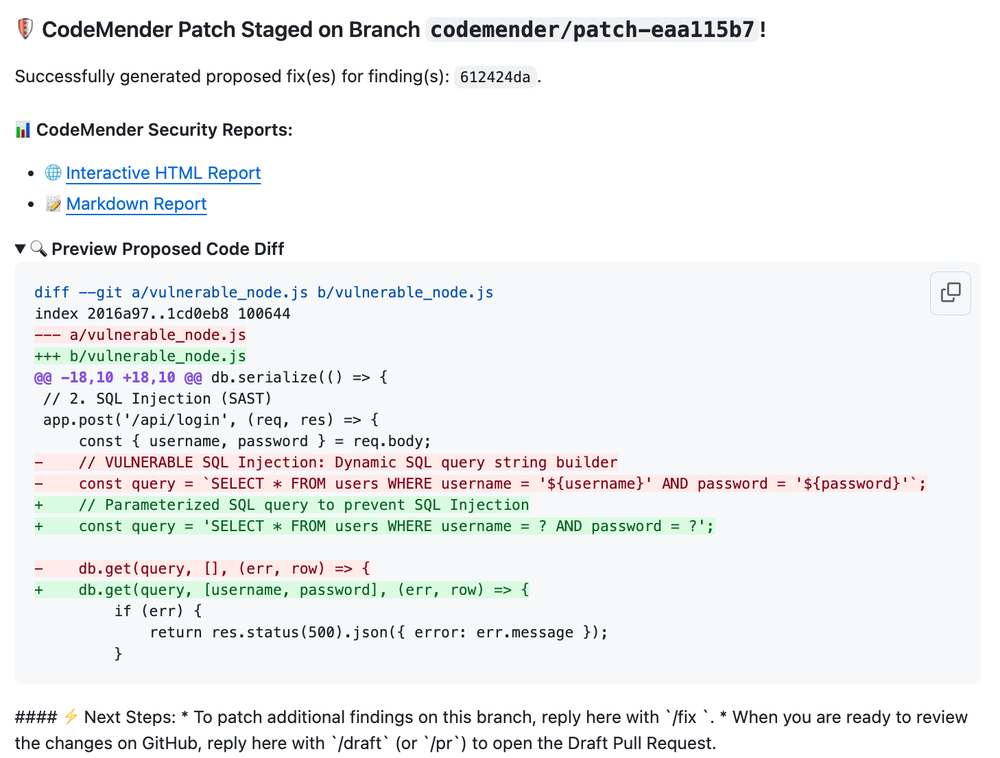
If the diff looks good, applying it takes one step. The developer replies /approve. The agent commits the patch to the branch, pushes it, and sets a commit status security/codemender-gate to green. Branch protection is what turns that status into a merge block; without it, the gate is advisory.
No stored keys between GitHub and Cloud Run
None of this happens until GitHub and Google Cloud trust each other. This agent needs write access to your source code, precisely the credential you don’t want sitting in a secret store waiting to leak. GitHub Actions can mint a short-lived OIDC token instead, and Google can be configured to accept it, so nothing long-lived exists to steal.
Nearly all the security here rests on one line:
- code_block
- <ListValue: [StructValue([('code', 'resource "google_iam_workload_identity_pool_provider" "github" {rn workload_identity_pool_provider_id = "github-provider"rnrn oidc {rn issuer_uri = "https://token.actions.githubusercontent.com"rn }rnrn attribute_mapping = {rn "google.subject" = "assertion.sub"rn "attribute.repository_id" = "assertion.repository_id"rn }rnrn # Without this, any repository on GitHub can exchange a token against your poolrn attribute_condition = "assertion.repository_id == '123456789'"rn}'), ('language', ''), ('caption', )])]>
Every GitHub Actions workflow shares that issuer URL, so validating the issuer alone buys you nothing. The condition is the part doing the work.
Note what it matches on. assertion.repository would also work here, but it matches a name and names get renamed, or claimed by someone else once you release them. repository_id and repository_owner_id are immutable, which is why Google recommends mapping those instead.
Give the exploit somewhere safe to run
Verification runs attack code that nobody reviewed, written on demand, pointed at a mock target, doing what the vulnerability class implies. As recent headlines have reminded everyone, the last thing you want is an autonomous agent deciding the fastest way to complete a task is to break out of its container and port-scan your internal network.
Before you can trust the verdict, you have to answer two important questions: Where does that code execute, and what can it reach while it does? The answer is to run it as a Cloud Run job.
Every Cloud Run instance is sandboxed, and jobs always run in the second-generation execution environment, a microVM with full Linux compatibility. The execution starts, does one thing, and exits.
Figure 5: The exploit runs in an instance that holds nothing and lives for one finding. Only the verdict leaves.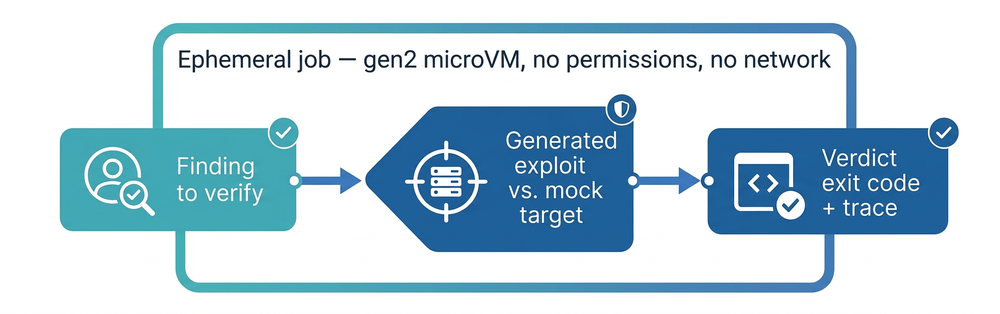
Then empty the room. Give the job a service account of its own and grant it nothing beyond the API that writes the exploit. It needs no registry access, because Cloud Run imports the container image when you deploy rather than pulling it at the instance start.
Skip the Compute Engine default account, which may carry roles/editor depending on your organization policy. Take the network away too: Direct VPC egress into a subnet with no route out means code that can’t call anywhere can’t exfiltrate what it finds or fetch a second stage.
Run one job per finding. The execution ends, the instance goes with it, and the verdict is the only thing that outlives either.
Cloud Run sandboxes or agent sandboxes close the last gap. In the instance, process execution is isolated from the parent workload, its environment variables, its secrets, and the Google Cloud metadata server, so the credential the platform hands out by default is out of reach as well. It’s built for agents running code they just wrote.
Get started today
You can build an autonomous GitOps security agent today. Start with the reference implementation at codemender-gitops.