
To make good business decisions, you need two kinds of data: the live state of the business from operational databases, and the historical context stored in an analytical system such as a lakehouse or a data warehouse. Traditionally, those systems have been separate, but they are now converging rapidly. That’s why today, we’re announcing direct Iceberg access in AlloyDB for PostgreSQL, in preview. Now, developers can query Apache Iceberg tables stored in a cloud storage bucket directly from AlloyDB and join them with live operational data, all in a single SQL query.
In addition, we’re announcing the general availability of AlloyDB sync and Lakehouse federation. Together, they give AlloyDB three ways to work with the borderless Lakehouse, which keeps one open copy of your data available to any engine. Etsy, for example, unified three petabytes with the borderless Lakehouse, joining data in place to accelerate pipeline queries by 60%. With AlloyDB, which approach to use depends on where the data lives and how your application reads it:
-
Direct Iceberg access: Read Iceberg tables in place, accelerated by the AlloyDB columnar engine.
-
AlloyDB sync: Serve lakehouse data from AlloyDB for your most latency-sensitive workloads, refreshed on a schedule you set.
-
Lakehouse federation: Query native BigQuery tables in place, with BigQuery doing the processing.
With this launch, apps and agents can act on operational and lakehouse data together without building or managing custom pipelines.
AlloyDB and the borderless Lakehouse: Query Apache Iceberg and BigQuery data in place or sync it to AlloyDB, giving real-time applications and AI agents governed access to operational and lakehouse data together.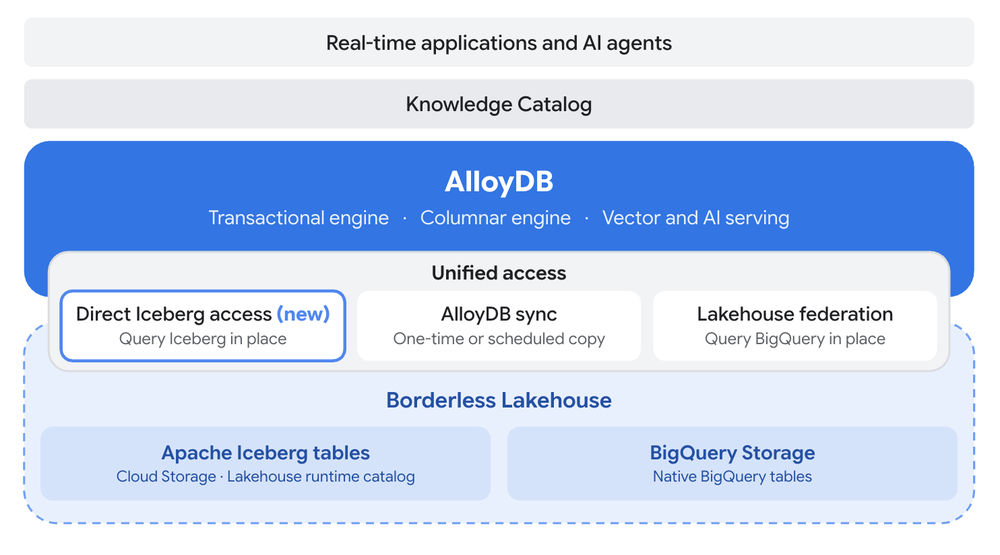
Decisions at the moment of action
With these integrations between AlloyDB and the borderless Lakehouse, historical context sits next to live transactions, so decisions can happen at the moment of action, without building or managing custom pipelines. For example:
-
Fraud and risk: Before approving a payment, a fraud agent checks it against five years of customer transaction history in Iceberg, in addition to the last 30 days in the database.
-
Personalization: A shopping agent joins the live cart with lifetime value and return history in the lakehouse to choose the right offer while the shopper is still on the page.
-
Dynamic pricing: A pricing agent combines live inventory in AlloyDB with years of demand and weather history in the lakehouse to adjust prices as conditions change.
-
Data products: A data team publishes curated tables once to Iceberg, and then dozens of applications read them in place instead of each maintaining its own copy.
In each case, the history stays in the lakehouse and the decision happens in the database. Agents act on your behalf using only the tables and permissions you grant them in AlloyDB.
Let’s take a deeper look at each of the three integrations.
Direct Iceberg access in AlloyDB (Preview)
With direct Iceberg access, AlloyDB reads Apache Iceberg tables directly from Cloud Storage, using either a bucket path or the Lakehouse runtime catalog. You register an Iceberg table once and query it like any other PostgreSQL table, including joins with live operational tables.
- code_block
- <ListValue: [StructValue([('code', "– Register five years of transaction history stored as IcebergrnCREATE TABLE transaction_history (rn customer_id BIGINT, category TEXT, amount NUMERIC, ts TIMESTAMPTZ)rnUSING icebergrnWITH (uri = 'gs://my-bucket/warehouse/payments/transaction_history');rnrnrn– Compare the payment in flight with the customer's historyrnSELECT t.amount,rn AVG(h.amount) AS usual_spend,rn MAX(h.amount) AS largest_past_purchasernFROM recent_transactions t — live, in AlloyDBrnJOIN transaction_history h — five years, in Icebergrn ON h.customer_id = t.customer_id AND h.category = t.categoryrnWHERE t.transaction_id = 'TX-1001'rnGROUP BY t.amount;"), ('language', ''), ('caption', )])]>
AlloyDB reads Iceberg tables in place and joins them with live operational data, using the same copy as the rest of your lakehouse.
Iceberg support is built into AlloyDB and is accelerated by the AlloyDB columnar engine, so queries over lakehouse data are fast. They run on the same database instance as your application, without a separate reader instance to manage, and they read the latest data your team has published to the lakehouse.
In our testing on a 1 TB dataset in Cloud Storage, AlloyDB direct Iceberg access is up to 7x faster on aggregation queries than Amazon’s comparable PostgreSQL-compatible service, and up to 3.5x faster on aggregation queries than the open-source PostgreSQL extension.
AlloyDB sync for the lowest-latency reads (GA)
Not every table needs to be read in place. A retail merchant risk score, for example, is checked before every payment but only changes when the data team recomputes it overnight. Data like this, read on every request and refreshed on a schedule, is fastest as a local table in AlloyDB. The challenge is keeping that copy fresh without building and maintaining a pipeline.
AlloyDB sync copies lakehouse data from BigQuery into AlloyDB, once or on a schedule, and keeps it refreshed. The copy is a local AlloyDB table, so your app reads it as fast as any other table, and you can index it, serve it from read pools, or use it with the columnar engine and vector search. You can start a sync with one click from the BigQuery console or from SQL:
- code_block
- <ListValue: [StructValue([('code', "– Keep merchant risk scores refreshed every hourrnSELECT alloydb_sync.create_bq_sync_table(rn 'my-project.risk.merchant_risk_scores',rn 'merchant_risk_scores',rn INTERVAL '1 hour');"), ('language', ''), ('caption', )])]>
Lakehouse federation (GA)
For organizations with years of analytical history already in BigQuery, Lakehouse federation lets AlloyDB query native BigQuery tables in place and join them with live operational data in a single query. AlloyDB pushes filters, aggregations, and limits down to BigQuery, which does most of the processing and sends back only the results. You can also set which project is billed for these queries and restrict which roles can use them.
Google Cloud customers like Loyal Guru are already pairing AlloyDB and BigQuery in this way.
“AlloyDB, along with other Google Cloud products like BigQuery, provides the agility and performance needed to continually enhance our platform’s capabilities and help us anticipate emerging trends rather than merely reacting.” – Javi Fernández, Co-founder & CTO, Loyal Guru
Choose the right approach and get started
The convergence of operational and analytical systems is underway; how you choose to approach it in a Google Cloud environment depends on your use case:
-
Direct Iceberg access: Best for historical data in Iceberg that your app joins with live data, accelerated by the AlloyDB columnar engine.
-
Try it: Enable direct Iceberg access on a PostgreSQL 18 instance and follow: Access Iceberg data from AlloyDB.
-
AlloyDB sync: Best for tables your app reads constantly and needs at the lowest latency. The copy is as fresh as its last refresh.
-
Build: Pick a table in BigQuery and choose to sync to AlloyDB using the Google Cloud console or psql.
-
Lakehouse federation: Best for history that lives in native BigQuery tables, processed by BigQuery.
-
Start: Follow Configure AlloyDB access to real-time data in BigQuery.
Read Choose how to access BigQuery data from AlloyDB to learn more.